Showing posts sorted by relevance for query qr map. Sort by date Show all posts

Sunday, August 31, 2008

QR map - 2

The long series of updates in our maps mashups (see Big Map, Mobile maps) - there is a new version for QR map too. See it here. We hope that the navigation is now much more flexible.

With QR Map you center the map so that the pointer is on your location (or use a search icon), set the scale and then click on the mail icon at the top of the map. You will see Tiny URL with QR code. E.g. (http://tinyurl.com/6fkdf9):


The Tiny URL redirects to a Google Chart Server API generated QR Code. The QR Code decodes as a Google 240 x 320 static map for mobiles:


QR map is a very simply and elegant way for the map data delivery. E.g. mobile scans the code somewhere on the street and gets the map for the nearby area.

Saturday, July 12, 2008

QR map

QR codes let you encode some useful data with 2D barcodes. Here is an idea: let us encode the map. So the published QR code could be scanned by the mobile phone and lead to the nearby area map. The next step is obvious - Google Map + Google Chart + Google static map + Tiny URL lead to the new mashup: QR map
You can choose the location (center the map), set the scale and get a Tiny URL for the QR code encodes the map (240 x 320 size – right for the mobile phones). For getting the QR code (image url) just hit a mail icon on the map

P.S. the pure (not QR code) map for the mobile users is still available via Mobile map mashup.

Tuesday, June 28, 2011

Mobile bookmark for locations

Our mashup Location bookmark has been updated again. It lets you create two things:

1) QR code for mobile map associated with the given address
2) HTML for putting that QR code on your site

So with this tool you can place on your own site (blog etc.) – e.g. somewhere in Contacts or About pages QR code for any given address (e.g. address of your company, office etc.). And any visitor of your site will be able simply to scan this code and load that map right into own phone. So they (visitors) do not need to write/print/remember your address/driving directions anymore. He/she can just load an appropriate mobile map right from your site. Loaded map could be simply bookmarked on the phone (loaded map is just URL).
And driving directions as well as many other interesting things will come automatically with the mobile map (we are using Geo Messages).

Of course, QR code created with this mashup could be placed anywhere. E.g. add it to some article in your blog, print and place it on the wall etc. Also QR – code is just a view that simplify loading of some mobile-friendly URL with map. Actually mashups creates at the first hand that URL and only after that creates QR-code for it. So you can publish in your blog a mobile-friendly URL too. Your mobile readers will be able to open/bookmark that URL directly.

P.S. similar projects:

QR map - lets you create QR code right from the map. This mashup also can create a link to mobile friendly map (iPhone, Android).
Mecard - lets you create QR code for loading address data (contact info) right from your site
Location from Twitter - lets you copy address info from Twitter (via QR-code again)
Tips - lets you copy address data right from social recommendations (Foursquare).

Monday, October 18, 2010

Bookmark for locations

Our mashup Location bookmark has been updated. It lets you create two things:

1) QR code for mobile map associated with the given address
2) HTML for putting that QR code on your site

So with this tool you can place on your own site (blog etc.) – e.g. somewhere in Contacts or About pages QR code for any given address (e.g. address of your company, office etc.). And any visitor of your site will be able simply to scan this code and load that map right into own phone. So they (visitors) do not need to write/print/remember your address/driving directions anymore. He/she can just load an appropriate mobile map right from your site. Loaded map could be simply bookmarked on the phone (loaded map is just URL).
And driving directions as well as many other interesting things will come automatically with the mobile map (we are using Geo Messages).

Of course, QR code created with this mashup could be placed anywhere. E.g. add it to some article in your blog, print and place it on the wall etc. Also QR – code is just a view that simplify loading of some mobile-friendly URL with map. Actually mashups creates at the first hand that URL and after that creates QR-code for it. So you can publish in your blog a mobile-friendly URL too. Your mobile readers will be able to open that URL directly.

P.S. similar projects:

QR map - lets you create QR code right from the map. This mashup also can create a link to mobile friendly map (iPhone, Android).
Mecard - lets you create QR code for loading address data (contact info) right from your site
Location from Twitter - lets you copy address info from Twitter (via QR-code again)
Tips - lets you copy address data right from social recommendations (Foursquare).

Monday, April 11, 2011

Mobile bookmarks for locations

Our mashup Location bookmark has been updated. It lets you create two things:

1) QR code for mobile map associated with the given address
2) HTML for putting that QR code on your site

So with this tool you can place on your own site (blog etc.) – e.g. somewhere in Contacts or About pages QR code for any given address (e.g. address of your company, office etc.). And any visitor of your site will be able simply to scan this code and load that map right into own phone. So they (visitors) do not need to write/print/remember your address/driving directions anymore. He/she can just load an appropriate mobile map right from your site. Loaded map could be simply bookmarked on the phone (loaded map is just URL).
And driving directions as well as many other interesting things will come automatically with the mobile map (we are using Geo Messages).

Of course, QR code created with this mashup could be placed anywhere. E.g. add it to some article in your blog, print and place it on the wall etc. Also QR – code is just a view that simplify loading of some mobile-friendly URL with map. Actually mashups creates at the first hand that URL and after that creates QR-code for it. So you can publish in your blog a mobile-friendly URL too. Your mobile readers will be able to open that URL directly.

P.S. similar projects:

QR map - lets you create QR code right from the map. This mashup also can create a link to mobile friendly map (iPhone, Android).
Mecard - lets you create QR code for loading address data (contact info) right from your site
Location from Twitter - lets you copy address info from Twitter (via QR-code again)
Tips - lets you copy address data right from social recommendations (Foursquare).

Wednesday, August 15, 2012

Bookmarks for locations. QR codes practice.

Our mashup Location bookmark has been updated. It is a practical use case for QR codes. Mashup lets you create two things:

1) QR code for mobile map associated with the given address
2) HTML for putting that QR code on your site

So with this tool you can place on your own site (blog etc.) – e.g. somewhere in Contacts or About page QR code for any given address (e.g. address of your company, office etc.). And any visitor of your site will be able simply to scan this code and load that map right into own phone. So they (visitors) do not need to write/print/remember your address/driving directions etc. Just load an appropriate mobile map right from your site. Loaded map could be simply bookmarked on the phone (loaded map is just URL).
And driving directions as well as many other interesting things will come automatically with the mobile map (we use Geo Messages here).

Of course, QR code created with this mashup could be placed anywhere. E.g. add it to some article in your blog, print and place it on the wall etc.

P.S. similar projects:

QR map - lets you create QR code right from the map. Also can create a link to mobile friendly map (iPhone, Android, Bada – any phone with HTML5 browser).
Mecard - lets you create QR code for loading address data (contact info) right from your site
QR-code FAQ - QR codes use cases and how-to.

Sunday, October 23, 2011

Bookmarks for locations

Our mashup Location bookmark has been updated. It is a practical use case for QR codes. Mashup lets you create two things:

1) QR code for mobile map associated with the given address
2) HTML for putting that QR code on your site

So with this tool you can place on your own site (blog etc.) – e.g. somewhere in Contacts or About page QR code for any given address (e.g. address of your company, office etc.). And any visitor of your site will be able simply to scan this code and load that map right into own phone. So they (visitors) do not need to write/print/remember your address/driving directions etc. Just load an appropriate mobile map right from your site. Loaded map could be simply bookmarked on the phone (loaded map is just URL).
And driving directions as well as many other interesting things will come automatically with the mobile map (we use Geo Messages here).

Of course, QR code created with this mashup could be placed anywhere. E.g. add it to some article in your blog, print and place it on the wall etc.

P.S. similar projects:

QR map - lets you create QR code right from the map. Also can create a link to mobile friendly map (iPhone, Android, Bada – any phone with HTML5 browser).
Mecard - lets you create QR code for loading address data (contact info) right from your site

Tuesday, June 22, 2010

Location bookmark

A practical usage of QR code technology. Mashup Location bookmark lets you create two things:

1) QR code for mobile map associated with the given address
2) HTML for putting that QR code on your site

So with this tool you can place on your own site (blog etc.) – e.g. somewhere in Contacts or About page QR code for any given address (e.g. address of your company, office etc.). And any visitor of your site will be able simply to scan this code and load that map right into own phone. So they (visitors) do not need to write/print/remember your address/driving directions etc. Just load an appropriate mobile map right from your site. Loaded map could be simply bookmarked on the phone (loaded map is just URL).
And driving directions as well as many other interesting things will come automatically with the mobile map (we are using Geo Messages).

Of course, QR code created with this mashup could be placed anywhere. E.g. add it to some article in your blog, print and place it on the wall etc.

P.S. similar projects:

QR map - lets you create QR code right from the map. Also can create a link to mobile friendly map (iPhone, Android).
Mecard - lets you create QR code for loading address data (contact info) right from your site

Tuesday, November 18, 2008

Mobile map via QR code

A new version of QR map mashup has been released. It is a simple way for saving any map on your mobile phone using QR-codes technology. Choose the position on the map (the red marker points to the center), set the scale and simply move cursor over the marker. You will see a QR code for the selected map. So you can scan it with your mobile and transfer this map right to your phone. And mobile map will be presented as a static picture, so this technology is working on any mobile.

Also you can share the generated QR-code via email, twitter or facebook.

P.S. and for the preparing mobile map without any QR-code you can use another mashup: Mobile map.

P.P.S. 100 posts in this blog.

Wednesday, February 17, 2010

Big mobile map

Mobile mashup Big map has been updated. Mashup implements a new way for sharing location info to mobile users. This web application offers a full screen map with some marker pointing to the current position. Initially marker will be placed automatically but you can of course drag it to the new position. And as soon as you click on it, you will be able to send a link to the map via email and SMS. No registration, no passwords etc. Just send (share) a map. And do it via the standard messaging. Also gmail.com users can Buzz own locations right from the map.


Also you can bookmark locations in your mobile browser. Just hit a link within the info window. And bookmark the opened page.

Link to mobile web application is:

http://mbigmap.linkstore.ru (it is mobile site).

QR code

You can copy this link right to your mobile from QR code on the left. Also you can use this short URL http://bit.ly/7zu3iY.

It works on iPhone, Android and S60 phones.

P.S. and static maps for mobile users could be created with the following mashups: Mobile maps and QR map

Thursday, October 11, 2012

QR codes for maps

Our mashup QR maps has been updated. It lets you create QR-codes for loading mobile maps. Any map here is either static picture (you can use it for any mobile phone) or dynamic web mashup (it could be used for Android, iPhone or any another HTML5 browser – we are using our tools from инструменты от Geo Messages)

Mashup let you create QR-code for direct map loading and HTML fragment for placing that QR-code on site (blog, etc.) So, it is a tool that helps you create and distribute mobile maps. Type (size) for map could be configured.

By default, mashup will ask about location for the map (area that should be used for creating QR-codes). You can directly describe geo area you are interested in. The basic URL can proceed the following optional parameters:

lat - latitude
lng - longitude
zml - a zoom for the map (by default it is 14)

For example: Mobile Maps for San Francisco

Tuesday, April 27, 2010

Share location info

Mobile mashup Big map has been updated. Mashup implements a new way for sharing location info to mobile users. This web application offers a full screen map with some marker pointing to the current position. Initially marker will be placed automatically but you can of course drag it to the new position. And as soon as you click on it, you will be able to send a link to the map via email and SMS. No registration, no passwords etc. Just send (share) a map. And do it via the standard messaging. Also gmail.com users can Buzz own locations right from the map.


Also you can bookmark locations in your mobile browser. Just hit a link within the info window. And bookmark the opened page.

Link to mobile web application is:

http://mbigmap.linkstore.ru (it is mobile site).

QR code

You can copy this link right to your mobile from QR code on the left. Also you can use this short URL http://bit.ly/7zu3iY.

It works on iPhone, Android and S60 phones.

One possible use case - car parking info

P.S. and static maps for mobile users could be created with the following mashups: Mobile maps and QR map

Wednesday, February 03, 2010

Share and bookmark locations from your mobile

Mobile mashup Big map has been updated. Mashup implements a new way for sharing location info to mobile users. This web application offers a full screen map with some marker pointing to the current position. Initially marker will be placed automatically but you can of course drag it to the new position. And as soon as you click on it, you will be able to send a link to the map via email and SMS. No registration, no passwords etc. Just send (share) a map. And do it via the standard messaging.


Also you can bookmark locations in your mobile browser. Just hit a link within the info window. And bookmark the opened page.

Link to mobile web application is:

http://mbigmap.linkstore.ru (it is mobile site).

QR code

You can copy this link right to your mobile from QR code on the left. Also you can use this short URL http://bit.ly/7zu3iY.

It works on iPhone, Android and S60 phones.

P.S. and static maps for mobile users could be created with the following mashups: Mobile maps and QR map

Tuesday, December 08, 2009

How to share location info from mobile

QR code
Mobile mashup Big map implements a new way for sharing location info to mobile users. This web application offers a full screen map with some marker pointing to the current position. Initially marker will be placed automatically but you can of course drag it to the new position. And as soon as you click on it, you will be able to send a link to the map via email and SMS. No registration, no passwords etc. Just send (share) a map. And do it via the standard messaging. Link to mobile web application is:

http://mbigmap.linkstore.ru (it is mobile site).

You can copy this link right to your mobile from QR code above. Also you can use this short URL http://bit.ly/7zu3iY.

It works on iPhone, Android and S60 phones.

P.S. and static maps for mobile users could be created with the following mashups: Mobile maps and QR map

Monday, January 18, 2010

Bookmark locations on the mobile

Mobile mashup Big map has been updated. Mashup implements a new way for sharing location info to mobile users. This web application offers a full screen map with some marker pointing to the current position. Initially marker will be placed automatically but you can of course drag it to the new position. And as soon as you click on it, you will be able to send a link to the map via email and SMS. No registration, no passwords etc. Just send (share) a map. And do it via the standard messaging.


Also you can bookmark locations in your mobile browser. Just hit a link within the info window. And bookmark the opened page.

Link to mobile web application is:

http://mbigmap.linkstore.ru (it is mobile site).

QR code

You can copy this link right to your mobile from QR code on the left. Also you can use this short URL http://bit.ly/7zu3iY.

It works on iPhone, Android and S60 phones.

P.S. and static maps for mobile users could be created with the following mashups: Mobile maps and QR map

Thursday, December 03, 2009

Big mobile map

QR code
Google Maps API v. 3, should support mobile devices. So here is a model example - a full screen map for the mobile devices. It is a mobile analogue for our Big map mashup. Тhe same idea but for the mobile. Mobile link is:

http://mbigmap.linkstore.ru (it is mobile site).

You can copy this link right to your phone with QR code above. Also you can use a short URL: http://bit.ly/7zu3iY.

This map should work on iPhone and Android. I think S60 from Nokia should be supported also. Try it.

P.S. By the way, the static mobile maps could be created with our mashups Mobile maps and QR map.

Saturday, May 29, 2010

QR code for maps

Our mashup QR maps has been updated. Lets you create QR codes from maps.

Open mashup, select your area on the map (read marker always show the ceneter), set the scale and put your cursor (mouse) over the marker. You will see popup window with QR code. You can scan this code right from the screen with your mobile and load your map into your phone.

Click on the marker – you will see a current map size as well as a link for opening QR code image. This link helps you print QR code and/or embed it into another document.

By default mashup creates static maps (just images). Of course you can change the size for your maps (see Tools button on the top). Also you can create QR code for links to dynamic maps (iPhone, Android - Mobile maps mashup is used here)

Wednesday, June 09, 2010

How to share location info in Facebook

How to share your location info in Facebook. For example, set a meeting place, show your current location to your friends etc. Step by step guide via Mobile map mashup

1. Go from your mobile (iPhone, Android) browser to Mobile map


It is HTML5 web mashup. You can also scan this QR code

QR code

or type a short URL: http://bit.ly/7zu3iY

Red marker shows your current position. You can move this marker to some new place, of course. Now hit a marker:


See that fb link? Hit it and share link to this map with your Facebook social graph.

What your friends will see as soon as they open that link


The red marker is his/her own location, the blue one – is what was saved. Hit the blue marker:
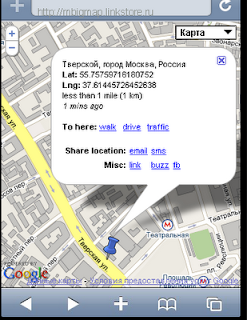


You will see when it was saved as well as the links for getting routes to this location.

P.S. you can do absolutely the same from your desktop browser

P.P.S. Note again - the map itself does not keep links back to your facebook account. This map knows nothing about you. So this map actually does not hurt your privacy. Map itself just says: hey, there is a saved marker. Nothing more. And this map is again nothing more than just an ordinary link in your Facebook stream. There are no your ID's within the map.

It is actually a main idea behind Geo Messages project – how to share location without revealing your ID.

Sunday, September 21, 2008

QR map - 3

QR map mashup (lets you create QR codes for maps) has been updated. See the updated version here

Monday, October 27, 2008

QR map - 4

QR map mashup has been updated. Mashup lets you create QR codes for maps and share them via email/twitter/facebook.