A great source for natural language processing / text data extraction - http://streamhacker.com. Code examples with NTK. Natural Language Toolkit presents Open source Python modules, linguistic data and documentation for research and development in natural language processing and text analytics, with distributions for Windows, Mac OSX and Linux.
Actually, we are planning to add NLP tools to our mashups like Buzz in Twitter
Monday, June 21, 2010


Sunday, June 20, 2010
Saturday, June 19, 2010
Statistics for sessions
Collect and analyze statistics for sessions in your web applications - Sessions stats listener and taglib.
Friday, June 18, 2010
JIL for Android
Vodafone adds Android to its 360 apps platform. It is really great deal - JavaScript access to mobile platform. It lets create services cheaper and faster. The first Android handsets to come preloaded with the 360 system and store will be the HTC Wildfire and Sony Ericsson Xperia X10 Mini Pro.
/via Geo Messages - this approach works on Samsung H1 too. As JIL widget exactly.
/via Geo Messages - this approach works on Samsung H1 too. As JIL widget exactly.
Thursday, June 17, 2010
Geo Messages
Some updates on our Geo Messages project site.
P.S. "Mobile operators should deliver location APIs specifically tuned for enabling check-ins, including the ability not just to place a user at a street location, but to a more fine-grained spot as well — for instance, the business at that location. Also, think about ways that existing telecom offerings could drive Foursquare-style services. For instance, could SMS become a major conduit into Foursquare the way it is into Twitter today (and the way Twitter is trying to explicitly link itself to Foursquare, as we saw above)? All it would take is some smart integration between SMS and network location APIs and servers." - from here. Great words. It is exactly what Geo Messages approach is for. It integrates mobile messaing and location.
P.S. "Mobile operators should deliver location APIs specifically tuned for enabling check-ins, including the ability not just to place a user at a street location, but to a more fine-grained spot as well — for instance, the business at that location. Also, think about ways that existing telecom offerings could drive Foursquare-style services. For instance, could SMS become a major conduit into Foursquare the way it is into Twitter today (and the way Twitter is trying to explicitly link itself to Foursquare, as we saw above)? All it would take is some smart integration between SMS and network location APIs and servers." - from here. Great words. It is exactly what Geo Messages approach is for. It integrates mobile messaing and location.
Wednesday, June 16, 2010
Tuesday, June 15, 2010
Share location info in Twitter
Our mashup Location in Twitter has been updated. Lets you post (share) some location data in Twitter. Suppose you need to inform readers about some meeting place, show office location etc. - this mashup lets you post mobile friendly map link. Or you simply need to tell where you are without switching on geocoding in Twitter - use this tool. Some form of check-in.
Monday, June 14, 2010
Mobile maps
Our mashup Mobile maps has been updated. Full screen map for mobiles (iPhone, Android) lets you share location info as a signature for the standard messages.
Now with this mashup you can easily create links for your mobile sites. For example you can use the following parameters for this URL:
t - text for POI
lat - POI's latitude
lng - POI's longitude
email - default email address
phone - default phone for SMS
instead of (lat, lng) pair you can use another parameter
a - address for your POI
For example, UK Prime Minister
P.S. it is HTML5 web application, so the same will work in your desktop browser too, except SMS sharing of course.
P.P.S. by the way, on your desktop you can create a QR code for such link and let visitors of your site load address of your company (event etc.) right to own mobile phone.
/via Geo Messages
Now with this mashup you can easily create links for your mobile sites. For example you can use the following parameters for this URL:
t - text for POI
lat - POI's latitude
lng - POI's longitude
email - default email address
phone - default phone for SMS
instead of (lat, lng) pair you can use another parameter
a - address for your POI
For example, UK Prime Minister
P.S. it is HTML5 web application, so the same will work in your desktop browser too, except SMS sharing of course.
P.P.S. by the way, on your desktop you can create a QR code for such link and let visitors of your site load address of your company (event etc.) right to own mobile phone.
/via Geo Messages
Saturday, June 12, 2010
A Non-Mathematical Introduction to Using Neural Networks
"The goal of this article is to help you understand what a neural network is, and how it is used. Most people, even non-programmers, have heard of neural networks. There are many science fiction overtones associated with them. And like many things, sci-fi writers have created a vast, but somewhat inaccurate, public idea of what a neural network is." - a good introduction to using Neural Networks
Friday, June 11, 2010
Data science
"Tim O'Reilly said that "data is the next Intel Inside." But what does that statement mean? Why do we suddenly care about statistics and about data?" - a great read about the modern Data science
Thursday, June 10, 2010
Wednesday, June 09, 2010
Mobile map
Our mashup Mobile map has been updated. This mobile web application lets you share location info via Email, SMS, Twitter or Facebook. Mashup works with any HTML5 browser, so you can use it on iPhone, Android platform, Samsung phones etc.
You can load the above-mentioned URL with the following QR-code:

This application is yet another implementation for our Geo Messages approach – share location info on peer to peer basic, using signed messages.
You can load the above-mentioned URL with the following QR-code:
This application is yet another implementation for our Geo Messages approach – share location info on peer to peer basic, using signed messages.
How to share location info in Facebook
How to share your location info in Facebook. For example, set a meeting place, show your current location to your friends etc. Step by step guide via Mobile map mashup
1. Go from your mobile (iPhone, Android) browser to Mobile map

It is HTML5 web mashup. You can also scan this QR code

or type a short URL: http://bit.ly/7zu3iY
Red marker shows your current position. You can move this marker to some new place, of course. Now hit a marker:

See that fb link? Hit it and share link to this map with your Facebook social graph.
What your friends will see as soon as they open that link

The red marker is his/her own location, the blue one – is what was saved. Hit the blue marker:
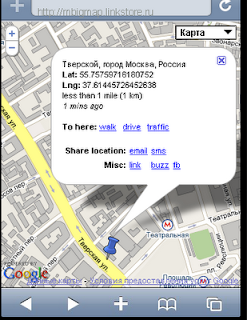
You will see when it was saved as well as the links for getting routes to this location.
P.S. you can do absolutely the same from your desktop browser
P.P.S. Note again - the map itself does not keep links back to your facebook account. This map knows nothing about you. So this map actually does not hurt your privacy. Map itself just says: hey, there is a saved marker. Nothing more. And this map is again nothing more than just an ordinary link in your Facebook stream. There are no your ID's within the map.
It is actually a main idea behind Geo Messages project – how to share location without revealing your ID.
1. Go from your mobile (iPhone, Android) browser to Mobile map

It is HTML5 web mashup. You can also scan this QR code
or type a short URL: http://bit.ly/7zu3iY
Red marker shows your current position. You can move this marker to some new place, of course. Now hit a marker:

See that fb link? Hit it and share link to this map with your Facebook social graph.
What your friends will see as soon as they open that link

The red marker is his/her own location, the blue one – is what was saved. Hit the blue marker:

You will see when it was saved as well as the links for getting routes to this location.
P.S. you can do absolutely the same from your desktop browser
P.P.S. Note again - the map itself does not keep links back to your facebook account. This map knows nothing about you. So this map actually does not hurt your privacy. Map itself just says: hey, there is a saved marker. Nothing more. And this map is again nothing more than just an ordinary link in your Facebook stream. There are no your ID's within the map.
It is actually a main idea behind Geo Messages project – how to share location without revealing your ID.
Tuesday, June 08, 2010
ForumSquare
City – forums. Tips from Foursquare mashed up with cloud forums (from Disqus):
http://linkstore.ru/tips
Open any info window for the tip and hit icon near the venue name. You will get a discussion forum associated with this venue. Share the link (see icon on the top of the screen) and discuss this place.
http://linkstore.ru/tips
Open any info window for the tip and hit icon near the venue name. You will get a discussion forum associated with this venue. Share the link (see icon on the top of the screen) and discuss this place.
Monday, June 07, 2010
Useful tools
A short colllection:
1. Twitter stream in your PowerPoint. A nice suite from SAP.
2. Credit cards validation in JSP (and/or Coldfusion). Lets you check the following cards (formats): VISA, MasterCard, American Express, Diners Club, enRoute, Discover and JCB.
3. Billing filter. Lets you log resources used by the visitors of your web application
1. Twitter stream in your PowerPoint. A nice suite from SAP.
2. Credit cards validation in JSP (and/or Coldfusion). Lets you check the following cards (formats): VISA, MasterCard, American Express, Diners Club, enRoute, Discover and JCB.
3. Billing filter. Lets you log resources used by the visitors of your web application
Sunday, June 06, 2010
LBS in business
21 Unique Location Examples from Foursquare, Gowalla, Whrrl, and MyTown - see it here
/via Geo Message
/via Geo Message
New format in Google Maps?

Saturday, June 05, 2010
Social Media Analysis with Hadoop
"In this tutorial we will discuss the use of Hadoop for processing large-scale social data sets. We will first cover the map/reduce paradigm in general and subsequently discuss the particulars of Hadoop's implementation. We will then present several use cases for Hadoop in analyzing example data sets, examining the design and implementation of various algorithms with an emphasis on social network analysis. Accompanying data sets and code will be made available." - see Large-Scale Social Media Analysis with Hadoop
Friday, June 04, 2010
About HTML5
A useful collection of resources:
Building iPhone Apps with HTML, CSS, and JavaScript - free book from O'Reilly
Building Android Apps with HTML, CSS, and JavaScript - free book from O'Reilly
HTML5 tests for mobile
/via Geo Messages - innovative HTML5 mobile web mashups.
Building iPhone Apps with HTML, CSS, and JavaScript - free book from O'Reilly
Building Android Apps with HTML, CSS, and JavaScript - free book from O'Reilly
HTML5 tests for mobile
/via Geo Messages - innovative HTML5 mobile web mashups.
Thursday, June 03, 2010
Foursquare tips
Our mashup Foursquare tips has been updated. This mashup lets you see tips from Foursquare on Google Map. What is new:
- direct access to Foursquare user pages right from tips (just click on the photo)
- search for venues (Google, Twitter). You can look for more information about venue in Google and Twitter right from the tip
Also you can directly set (latitude, longitude) pair for the area you are interested in. Parameters for the URL are:
lat - latitude
lng - longitude
For example, London in Foursquare
- direct access to Foursquare user pages right from tips (just click on the photo)
- search for venues (Google, Twitter). You can look for more information about venue in Google and Twitter right from the tip
Also you can directly set (latitude, longitude) pair for the area you are interested in. Parameters for the URL are:
lat - latitude
lng - longitude
For example, London in Foursquare
Wednesday, June 02, 2010
Geo talks
Our mashup Geo Talk has been updated. It lets you create forums (discussions) linked to the particular place on the map.
Just mark a place, type a question (suggestion, information etc.) – in other words create an initiation for the discussion and get unique link for the map with embedded forum. After that you can share this link with your partners/colleges, print in your blog / twitter etc. – it depends on your own decision only – who you want to see among readers. And after that you can just follow to the discussion.
No registration required.
Just mark a place, type a question (suggestion, information etc.) – in other words create an initiation for the discussion and get unique link for the map with embedded forum. After that you can share this link with your partners/colleges, print in your blog / twitter etc. – it depends on your own decision only – who you want to see among readers. And after that you can just follow to the discussion.
No registration required.
Technically, it is Google Maps + cloud forums from Disqus.
You can discuss some geo points, POI’s (points of interests – shops, bars etc.) or, for example, create a private forum devoted so some meeting in the selected place.
Just for example – forum for Golden Apple bar in Moscow
Initially mashup ( http://geotalk.linkstore.ru ) is trying to detect your location (as per W3C spec). If you know that forums should be created in some particular area just set additional parameters for the above-mentioned URL:
lat - latitude
lng – longitude
zml – initial zoom level
E.g. create forums in London
Tuesday, June 01, 2010
Monday, May 31, 2010
Recursive queries
"We deal with an enormous set of information, and some threads have literally thousands of repies. Pulling this down into memory isn’t a problem when 99% of threads only have a hundred replies, but when they start to peak we end up wasting a lot of time. Recursion within PGSQL allows us to easily pass off this work to the database (which just so happens to be able to do it faster than we ever could), and save us a ton of network traffic and web processing time in the process.
To give you an idea of the effect this will have (pending everything works out), we’ve seen savings of up to 500% on some large datasets, just for the SQL processing time (returning 25 results, rather than 1000). This doesn’t even represent the cost in our application layer. Yes, you heard that right, the SQL statement is 5x more performant at the database level alone." - from here: Recursive_queries in PostgeSQL. Real example from Disqus (cloud discussions).
P.S. I can confirm that Disqus shows a good perfomance in our mashups (see Geo talk, for example).
To give you an idea of the effect this will have (pending everything works out), we’ve seen savings of up to 500% on some large datasets, just for the SQL processing time (returning 25 results, rather than 1000). This doesn’t even represent the cost in our application layer. Yes, you heard that right, the SQL statement is 5x more performant at the database level alone." - from here: Recursive_queries in PostgeSQL. Real example from Disqus (cloud discussions).
P.S. I can confirm that Disqus shows a good perfomance in our mashups (see Geo talk, for example).
Sunday, May 30, 2010
Saturday, May 29, 2010
QR code for maps
Our mashup QR maps has been updated. Lets you create QR codes from maps.
Open mashup, select your area on the map (read marker always show the ceneter), set the scale and put your cursor (mouse) over the marker. You will see popup window with QR code. You can scan this code right from the screen with your mobile and load your map into your phone.
Click on the marker – you will see a current map size as well as a link for opening QR code image. This link helps you print QR code and/or embed it into another document.
By default mashup creates static maps (just images). Of course you can change the size for your maps (see Tools button on the top). Also you can create QR code for links to dynamic maps (iPhone, Android - Mobile maps mashup is used here)
Open mashup, select your area on the map (read marker always show the ceneter), set the scale and put your cursor (mouse) over the marker. You will see popup window with QR code. You can scan this code right from the screen with your mobile and load your map into your phone.
Click on the marker – you will see a current map size as well as a link for opening QR code image. This link helps you print QR code and/or embed it into another document.
By default mashup creates static maps (just images). Of course you can change the size for your maps (see Tools button on the top). Also you can create QR code for links to dynamic maps (iPhone, Android - Mobile maps mashup is used here)
Friday, May 28, 2010
MP3 player
This taglib lets you embed an MP3 file into a web page so that visitors can listen to the audio right in the browser itself without requiring an external player. Taglib simply adds Google Flash player for the given mp3 file. See MP3player taglib
Thursday, May 27, 2010
Wednesday, May 26, 2010
Foursquare tips - local version
In our mashup Foursquare tips you can directly set (latitude, longitude) pair for the area you are interested in. Parameters for the URL are:
lat - latitude
lng - longitude
For example, London in Foursquare
lat - latitude
lng - longitude
For example, London in Foursquare
Tuesday, May 25, 2010
Monday, May 24, 2010
Sunday, May 23, 2010
Saturday, May 22, 2010
How to extract metadata
Here is a very interesting project from Apache - Tika. Apache Tika is a toolkit for detecting and extracting metadata and structured text content from various documents using existing parser libraries. Here is a list of supported formats:
* HyperText Markup Language
* XML and derived formats
* Microsoft Office document formats
* OpenDocument Format
* Portable Document Format
* Electronic Publication Format
* Rich Text Format
* Compression and packaging formats
* Text formats
* Audio formats
* Image formats
* Video formats
* Java class files and archives
* The mbox format
See also some examples of programming Tika here.
* HyperText Markup Language
* XML and derived formats
* Microsoft Office document formats
* OpenDocument Format
* Portable Document Format
* Electronic Publication Format
* Rich Text Format
* Compression and packaging formats
* Text formats
* Audio formats
* Image formats
* Video formats
* Java class files and archives
* The mbox format
See also some examples of programming Tika here.
Friday, May 21, 2010
HTML5 on Google I/O
At a press conference after the keynote, Sergy Brin said he felt that the more limited hardware of mobile devices favored native apps for now, but that in a year or two desktop and mobile HTML5 capabilities will converge. What is happening now in the desktop browser is coming soon the mobile browser.
/via Geo Messages
/via Geo Messages
Thursday, May 20, 2010
Wednesday, May 19, 2010
LBS systems
An interesting article - Why Hasn’t Location Reached the Mainstream Yet?
"Because of privacy concerns, it is imperative for location-based services to clearly communicate the value proposition to users. Without a clear picture of what they’re getting in return, users may be hesitant to share location data." And do they (users) get a return at all? Mass location sharing (sharing location in social networks) help advertisers. It brings more precise targeting of course. But what about the users?
Than is why we think that Geo Messages approach has got more sense. In this case user just inform his/her partner on the peer to per basic "where I am". In the most cases you simply do not need to post this info into social network. In it not only the privacy issue. In the most cases is it signal vs. noise issue. Most of my circle in any social network simply do need (not interested) in my location data.
And by the way, we think that in systems like Foursquare tips information is more useful than raw check-in data.
"Because of privacy concerns, it is imperative for location-based services to clearly communicate the value proposition to users. Without a clear picture of what they’re getting in return, users may be hesitant to share location data." And do they (users) get a return at all? Mass location sharing (sharing location in social networks) help advertisers. It brings more precise targeting of course. But what about the users?
Than is why we think that Geo Messages approach has got more sense. In this case user just inform his/her partner on the peer to per basic "where I am". In the most cases you simply do not need to post this info into social network. In it not only the privacy issue. In the most cases is it signal vs. noise issue. Most of my circle in any social network simply do need (not interested) in my location data.
And by the way, we think that in systems like Foursquare tips information is more useful than raw check-in data.
Tuesday, May 18, 2010
Monday, May 17, 2010
Geo Messages - a new way for sharing location info
Coldbeans Software implements a set of mobile web mashups (HTML5 applications) that provide a new way for sharing location info sharing - Geo Messages.
Rather than let social network monitor your location (Google Latitude) or share your location info with some social circle (Foursquare check-in etc.) Geo Messages approach lets you share location data on the peer to peer basic. You can share your location info as a signature to the standard messaging (email, SMS). And what is important – shared location data (map) does not contain your identity. Your ID (name, phone) is in your email (SMS) only. The shared map does not reveal anything.
Sharing location info via the social network is not only a privacy issue. Very often it is signal vs. noise issue – most of the user’s circle in some social network is simply not interested in his/her location. And peer to peer sharing obviously solves this problem – your location data go to the interested party only.
600 billion text messages per year in the US ask "where are you?" - quote from Location Business Summit 2010. And Geo Messages offer a simple (one click) answer.
You can get mobile links right here: http://servletsuite.com/geomessage
Rather than let social network monitor your location (Google Latitude) or share your location info with some social circle (Foursquare check-in etc.) Geo Messages approach lets you share location data on the peer to peer basic. You can share your location info as a signature to the standard messaging (email, SMS). And what is important – shared location data (map) does not contain your identity. Your ID (name, phone) is in your email (SMS) only. The shared map does not reveal anything.
Sharing location info via the social network is not only a privacy issue. Very often it is signal vs. noise issue – most of the user’s circle in some social network is simply not interested in his/her location. And peer to peer sharing obviously solves this problem – your location data go to the interested party only.
600 billion text messages per year in the US ask "where are you?" - quote from Location Business Summit 2010. And Geo Messages offer a simple (one click) answer.
You can get mobile links right here: http://servletsuite.com/geomessage
Databases today
"Databases: relational vs object vs graph vs document. Is relational database dying? Why a model affirmed and finally consolidated over years is now object of discussion? Which alternatives exist and how they can match your needs in practical situations?" - a good overwiev of modern DB status
Sunday, May 16, 2010
YQL taglib
Perform your YQL requests right from JSP - YQL taglib. Coldfusion developers can use it too of course.
Saturday, May 15, 2010
Friday, May 14, 2010
Thursday, May 13, 2010
Natural language processing in Java
MALLET is a Java-based package for statistical natural language processing, document classification, clustering, topic modeling, information extraction, and other machine learning applications to text.
MALLET includes sophisticated tools for document classification: efficient routines for converting text to "features", a wide variety of algorithms (including Naïve Bayes, Maximum Entropy, and Decision Trees), and code for evaluating classifier performance using several commonly used metrics. - see it here.
MALLET includes sophisticated tools for document classification: efficient routines for converting text to "features", a wide variety of algorithms (including Naïve Bayes, Maximum Entropy, and Decision Trees), and code for evaluating classifier performance using several commonly used metrics. - see it here.
Wednesday, May 12, 2010
Traffic layer in HTML5 maps mashup
Google Maps API v.3 adds traffic layer. You can see it now in our Mobile map mashup. Try to share a location (or simply get a link for your map). And for the saved location mashup shows walking/driving directions as well as traffic conditions (of course, if they are applicable in your area).
P.S. waiting for ads manager :-)
/via Geo Messages
P.S. waiting for ads manager :-)
/via Geo Messages
Location via SS7
Locating mobile phones via SS7. Via sending MAP_SEND_ROUTING_INFO_FOR_SM request from own SMSC.
Tuesday, May 11, 2010
Geo Messages
A dedicated page devoted to our Geo messaging approach: explanations, links to mobile applications, articles - Geo Messages
Monday, May 10, 2010
Who is that
Our mashup Info from Twitter has been updated. For any account in Twitter lets you lookup other resources associated with this account. For example it could be a good way to check out who is that your new follower, or who you follow to etc.
Mashup does not require you to authorize in Twitter (and does not require from you have your own Twitter account). Just set any valid Twitter name on the mashup’s page or directly provide it in the request parameters:
http://tinfo.linkstore.ru?u=name_from_twitter
This new version adds more statistical data as well as integrates Google and LinkedIn search.
Mashup does not require you to authorize in Twitter (and does not require from you have your own Twitter account). Just set any valid Twitter name on the mashup’s page or directly provide it in the request parameters:
http://tinfo.linkstore.ru?u=name_from_twitter
This new version adds more statistical data as well as integrates Google and LinkedIn search.
Sunday, May 09, 2010
Browser for Twitter
A new way for Twitter reading - Eddi browser.
P.S. in this context we can remember two our mashups: Retwits in Twitter and Twitter buzz.
P.S. in this context we can remember two our mashups: Retwits in Twitter and Twitter buzz.
Saturday, May 08, 2010
Directory of mashups
Our mashups directory has been updated. Check out for example a dedicated page devoted to our Geo messaging approach.
Friday, May 07, 2010
Thursday, May 06, 2010
Wednesday, May 05, 2010
Geo SMS
At the first it was Geo Mail mashup. And now we can offer the similar tool: Geo SMS. Lets you share location info via SMS (Android, Nokia S60).
Use the following QR code for loading this mobile web application right to your phone:

or type the following short URL: http://bit.ly/9WTrpU
Use the following QR code for loading this mobile web application right to your phone:
or type the following short URL: http://bit.ly/9WTrpU
Tuesday, May 04, 2010
Data-Intensive Text Processing with MapReduce
Jimmy Lin, University of Maryland and Chris Dyer, University of Maryland:
"MapReduce is a programming model for expressing distributed computations on massive datasets and an execution framework for large-scale data processing on clusters of commodity servers. The programming model provides an easy-to-understand abstraction for designing scalable algorithms, while the execution framework transparently handles many system-level details, ranging from scheduling to synchronization to fault tolerance. This book focuses on MapReduce algorithm design, with an emphasis on text processing algorithms common in natural language processing, information retrieval, and machine learning. We introduce the notion of MapReduce design patterns, which represent general reusable solutions to commonly occurring problems across a variety of problem domains. This book not only intends to help the reader "think in MapReduce", but also discusses limitations of the programming model as well." - see book's PDF files here
"MapReduce is a programming model for expressing distributed computations on massive datasets and an execution framework for large-scale data processing on clusters of commodity servers. The programming model provides an easy-to-understand abstraction for designing scalable algorithms, while the execution framework transparently handles many system-level details, ranging from scheduling to synchronization to fault tolerance. This book focuses on MapReduce algorithm design, with an emphasis on text processing algorithms common in natural language processing, information retrieval, and machine learning. We introduce the notion of MapReduce design patterns, which represent general reusable solutions to commonly occurring problems across a variety of problem domains. This book not only intends to help the reader "think in MapReduce", but also discusses limitations of the programming model as well." - see book's PDF files here
Monday, May 03, 2010
600 billion
600 billion text messages per year in the US ask "where are you?" - as per Location Business Summit. A lot :-)
Is not it a big market for our Location sharing services? Even a simply geo aware email should be good!
Is not it a big market for our Location sharing services? Even a simply geo aware email should be good!
Sunday, May 02, 2010
Saturday, May 01, 2010
iStone
from the secret lab of one well known company:

author's page is here.
P.S. devoted to Mobile map mashup :-)

author's page is here.
P.S. devoted to Mobile map mashup :-)
Friday, April 30, 2010
Thursday, April 29, 2010
Geo Mail
 Geo Mail (it is a mobile link - iPhone, Android, Samsung) provides an email form where you type your message title and body and choose whether you want to include a link to either a scrollable or static Google map or just your latitude and longitude. When you hit the "Send" button GeoMail opens your device's default Email app with the message and location information pre-populated, all you have to do is specify the recipient and send the email.
You can download application right to your phone with the QR-code above. Or use the following short URL http://bit.ly/dr5H1m
P.S. Also check out our Geo post mashup here.
Wednesday, April 28, 2010
URL encoding
"This article describes common misconceptions about Uniform Resource Locator (URL) encoding, then attempts to clarify URL encoding for HTTP, before presenting frequent problems and their solutions. While this article is not specific to any programming language, we illustrate the problems in Java and finish by explaining how to fix URL encoding problems in Java, and in a web application at several levels." - see this very useful article here
Tuesday, April 27, 2010
Share location info
Mobile mashup Big map has been updated. Mashup implements a new way for sharing location info to mobile users. This web application offers a full screen map with some marker pointing to the current position. Initially marker will be placed automatically but you can of course drag it to the new position. And as soon as you click on it, you will be able to send a link to the map via email and SMS. No registration, no passwords etc. Just send (share) a map. And do it via the standard messaging. Also gmail.com users can Buzz own locations right from the map.
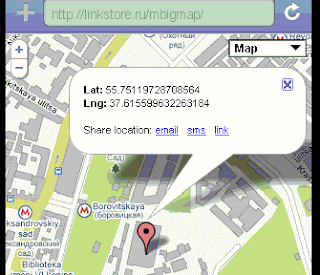
Also you can bookmark locations in your mobile browser. Just hit a link within the info window. And bookmark the opened page.
Link to mobile web application is:
http://mbigmap.linkstore.ru (it is mobile site).
You can copy this link right to your mobile from QR code on the left. Also you can use this short URL http://bit.ly/7zu3iY.
It works on iPhone, Android and S60 phones.
One possible use case - car parking info

Also you can bookmark locations in your mobile browser. Just hit a link within the info window. And bookmark the opened page.
Link to mobile web application is:
http://mbigmap.linkstore.ru (it is mobile site).
You can copy this link right to your mobile from QR code on the left. Also you can use this short URL http://bit.ly/7zu3iY.
It works on iPhone, Android and S60 phones.
One possible use case - car parking info
P.S. and static maps for mobile users could be created with the following mashups: Mobile maps and QR map
Monday, April 26, 2010
Sunday, April 25, 2010
Saturday, April 24, 2010
XPath in JSP
XPath taglib from Coldtags suite let you perform XPath requests right in JSP. See updated version here.
Friday, April 23, 2010
Mobile photo 3

Mobile version for our Photos from Twitter mashup has been updated:
http://localphoto.linkstore.ru (it is a mobile site).
You can see local photos as well as search them by the keywords. It works on Android, iPhone and S60 phones.
This new version adds the following features:
1) you can pass get-points as parameters for the above mentioned URL (parameters are lat - latitude and lng - longitude) and create a mobile link for photos. For example, live photos from London:
http://bit.ly/b58X2X
2) you can directly set search string. Parameter's name is q. For example:
http://localphoto.linkstore.ru?q=sport

You can copy mashup right to your phone with the QR code above. Or use the following short URL http://bit.ly/cX2cCd
Thursday, April 22, 2010
Cobrowse servlet
Web component implements co-browsing. You can open a session within this application, start your web surfing and everybody who is running the same servlet and is joined to the same session will see your pages - see Cobrowse servlet in JSOS
Wednesday, April 21, 2010
Tuesday, April 20, 2010
Memory Structure of Java Object
"Every object is aligned to an 8 byte granularity. The object except Array has two words header. First word has identity hash code and second work has a reference to the object’s class. So, new Object() will be using 8 byte of the heap for the two header words and nothing else because the Object class doesn’t have any fields. After 8 byte of header, the class attributes fallow. Attributes are always aligned in memory to their size. For example int are aligned to a byte granularity, and long are aligned to an 8 byte granularity. The cost to read 4 byte word from memory into a 4 byte register of the processor is much cheaper if the word is aligned to a 4 byte granularity." - very useful info for Java developers. Read it here
P.S. For web applications you can use the following component Session size tag. It lets you calculate memory size for the sessions.
P.S. For web applications you can use the following component Session size tag. It lets you calculate memory size for the sessions.
Monday, April 19, 2010
Website-less websites
An interesting idea: website-less websites. Everything is just an API. And clients display data via API's.
Sunday, April 18, 2010
Email scrambler
To make it more difficult for spam bots to "collect" email addresses from your page you can use this "scrambler" that turns the email address into its ASCII code equivalent - see MailTo taglib in Coldtags suite.
Saturday, April 17, 2010
Friday, April 16, 2010
Thursday, April 15, 2010
Operators warned on data charges
The European Union yesterday warned that telecom operators will not be allowed to charge online content providers to deliver high-bandwidth content to Internet users. - from here
Wednesday, April 14, 2010
Twitter media
Twitter releases a new guide for those looking to use twitter in media projects. Knowledge and tools to help you use Twitter to transform media, entertainment, and journalism - see it here
Tuesday, April 13, 2010
Mobile photo 2
Our mashup Photos from Twitter has got a mobile version:
http://localphoto.linkstore.ru (it is a mobile site).
You can see local photos as well as search them by the keywords. It works on Android, iPhone and S60 phones.
This new version adds the following features:
1) you can pass get-points as parameters for the above mentioned URL (parameters are lat - latitude and lng - longitude) and create a mobile link for photos. For example, live photos from London:
http://bit.ly/b58X2X
2) you can directly set search string. Parameter's name is q. For example:
http://localphoto.linkstore.ru?q=sport
You can copy mashup right to your phone with the QR code above. Or use the following short URL http://bit.ly/cX2cCd
Monday, April 12, 2010
QR code for your site
Java servlets filter lets you produce QR code for any URL in your web application. Just add .qr suffix for any URL and get QR code for it - QR code filter. So with this tool you can mobilize your web site automatically.
P.S. another "mobilization" tool is our QR code maker mashup
P.S. another "mobilization" tool is our QR code maker mashup
Sunday, April 11, 2010
Marketing in Twitter
"The research findings show that 19% of tweets contain a mention of a brand. Of the branding tweets, nearly 20% contained some expression of brand sentiments.
Of these, more than 50% were positive and 33% were critical of the company or product." - see here
Of these, more than 50% were positive and 33% were critical of the company or product." - see here
Saturday, April 10, 2010
Right for bloggers
 SnapIt Screen Capture - capture anything you see on your PC screen! Don't waste time cropping your captures.
Take a "snapshot" of anything exactly what you need, with just a click.
Irreplaceable tool for Bloggers, Designers, Office Workers, Business People,
Analysts, Technical Writers who have to describe interfaces, menus, buttons, etc. Lets you save files in BMP, GIF, JPEG, PNG and TIFF formats. Actually is a good replacement for the combination Shift-Print Screen + Paint we are using for creating shapshots right now.
Friday, April 09, 2010
Image info
Web component (custom JSP taglib) lets you show image and its description on the same place: Image zoom info taglib
Thursday, April 08, 2010
Signed geo messages
Introduction
It is obvious, that the question "where are you" is one of the most often asked during the communications. A huge amount of mobile services is actually being built around this question so their main feature is user’s location exchange. In the most cases it is implemented as the ability for the mobile user (mobile phone owner) write down own location info in the some special place (special mobile application). But it means of course, that user must be registered in this service (download some special application). And even more important – everyone who needs this information must use the same service too.
Our idea of the signed geo messages service (geo mail, geo sms) based on the adding user’s location info to the standard messages like SMS or email. Just as a signature. So with this service for telling somebody 'where I am' it would be just enough to send him/her a message. And your partner does not need to use any additional service in order to get information about your location. He/she will simply read SMS or email
Signed geo messages project presents a service for the mobile Internet and Smart Cards Web Server (SCWS). This service lets mobile users automatically add a special signature to the outgoing messages (email, SMS). And that special signature presents geo information for the current position of mobile terminal. So this service is probably the easiest way for sharing location information. It does not require any downloading or registration from the potential users and provides a smooth extension for the existing communication services.
Project description
The main idea behind this project is how to deliver location info via the standard messaging (SMS and Email). We are using the same approach all SMS delivery services are in. Typically, when the mobile users get some service via SMS it means he/she is getting actually some link within the text message. This link leads to the downloading service for pictures, ringtones etc. And this approach uses the simple fact that all native SMS clients nowadays are smart enough to discover links (just http://something_is_here text chunks) within the text and allow one click internet access (opening that link). So for our location related stuff we are using the same approach.
The location info will be presented as a link, leads to the appropriate map. So if the sender will be able to automatically add such a link to the message, the receiver will be able with one click open the map showing sender’s location (or open some mobile web page with the map – see below about the landing page).
Now we are ready to describe all the steps in our project.
1. The location info could be requested right from the sim-card (smart card) as Cell ID info. This information exists always and Java-card applet can read it (local info).
2. Cell ID information could be translated into "human"-readable form of (latitude, longitude) pair. There are several public services over the Net that let us do that. In our project we will use http://opencellid.org service. This service is free and provides a public HTTP based API.
3. Google static map. The Google Static Maps API lets you embed a Google Maps image on your webpage without requiring JavaScript or any dynamic page loading. The Google Static Map service creates your map based on URL parameters sent through a standard HTTP request and returns the map as an image you can display on your web page. In our case Google Static Maps API let us build a map (actually – an image for map) based on the latitude – longitude pair obtained through the step 2.
4. URL shortening service. In order to make sure our geo-related URL’s comply with SMS restrictions (simply – they are no more than 140 symbols) we can deploy URL shortening service and make our signature smaller. In our application we will use bit.ly shortening service. This service is also free and provides a public API.
5. In order to add our location aware URL to the message (to SMS or to email) we will deploy URI Scheme for GSM Short Message Service and The mailto URL scheme. So our final step included dynamical generation of the mobile web page with links for messaging:
sms:?body=our_geo_aware_URL
and
mailto:?body=our_geo_aware_URL
So as soon as the mobile user will hit one of the link the native (it is very important!) messaging client (e.g. the native SMS client) will be launched with the text (body) field pre-populated with the given URL. So it is enough just to select the target phone (address) from the address book, add some text (optionally, of course) and send the message.
So all in all this service presents a mobile mashup (mobile web mashup) that passes user through the series of screens where the last one offers for the user customized messages sending links (or one link if we keep SMS sending only for example). And all the process is
a) completely automated
b) does not require any authorization in external services
c) very portable and will work on any mobile phone
Main features
Signed geo message service offers a mobile web mashup lets users add a link with geo information to messages (SMS, email). So our signature is a text. And this text simply contains a dynamically generated link that leads either directly to the mobile map or to some landing page where mobile map is a part of it. And that mobile map (visible area) shows the current position of the sender. It is where the name of service is coming from – signed geo messages or geo signatures.
This service is actually a web application from the start to end. Service starts from SCWS code that requests local info from SIM card and ends with dynamically generated web page for sending messages.
Service converts Cell ID info obtained from the smart card to geo coordinates via the public service. Actually there is more than one public alternative for doing this job.
Upon getting the coordinates (latitude, longitude) for user’s location service creates a map as a visual form for the location info. For map generation service uses a public API from Google. It is important that service actually uses Google Static Map, where the map is actually presented as an image. So this map could be visible on any mobile phone (mobile browser), there are no JavaScript requirements etc.
For sending messages service deploys native clients from the mobile platform. It is actually a big plus because there is no need for users to study new application and all the existing address books will be available.
Usage scenario
Now let us see how our "geo signature" looks like.
1. Mobile user fires the browser and runs (opens) application web page. Web application for geo signature will be located on the SCWS, so it means just open some URL from http://localhost. As any URL it could be bookmarked in the mobile browser, so it is no more than just select some bookmark from the list
2. Opened web application requests smart card applet and gets local info (cell id at the first hand). Web application returns to the user a screen with information about the sharing locations (confirmation screen). This screen also contains a hyperlink points to the external web service. If user agreed to share contacts he/she hits the hyperlink and goes to the external mobile web site
3. Hyperlink contains an URL with parameters provided by the local info applet. So external web service gets a request with location parameters (cell is, mcc etc.)
4. Upon receiving the request external service creates own URL to the landing page, shortens this URL via public URL shortening service (e.g. http://bit.ly with public API) and responds with the "messaging" screen. This messaging screen contains in the general case just two links: for sending email and for sending SMS. Each link actually contains an appropriate URI scheme: mailto for email, and sms for SMS. In the both cases shortened URL is a parameter.
5. As soon as our user hits one of the messaging links the native client (for SMS or email) will be opened. And the body field will be pre-populated (pre-filled) with our short URL.
6. Now mobile user selects target address (phone) from the address book, probably adds more text and sends the message – everything is done in the native SMS client for example.
7. As soon as a message is received at the target party, the short URL in the text could be opened and our landing page (on the external service) gets a request. Landing service parses the parameters, request the OpenCellID service and gets the (latitude, longitude) pair. Service requests a map via static Google Map API (it is actually just an image) and dynamically composes the response. This response contains a map (just an image from the technical point of view) and (probably, optionally) an additional info. This additional info could be a geo-targeted advertising for example.
Such a response is actually a response the target party will get back after opening the "signature".
Here are some illustrations (step by step – from start to end):


What kind of variations could be implemented (proposed):
1. We can avoid the requests to the external service on the step 3. And immediately return (right from SCWS Servlet) the “messaging” screen with the landing page in the URI’s parameters. In this case URL shortening step will be skipped and our signature will have a true (long) link right to the landing page. But as a plus we will be able to serve signatures when the connection to the Internet is not available. The sender does not need the connection to the external web service. Only target party needs the connection for opening landing page
2. As an extension the previous option some kind of the emergency service could be created. We can send local info (cellID, mcc etc.) as a text (as is), leaving the interpretation of this info to the target party. If our target party is some application (application that will accept/proceed incoming SMS for example) the data could be easily extracted from the text and converted to the geo-friendly form. There is no landing page at all.
3. As an another extension to the “no Internet case” we can try to implement some kind of pseudo-shortening service right in SWCS Servlet (e.g. base 36 encoding) and shorten the URL to the landing page right on the mobile. So the landing page will be used in the short form.
4. If the browser on the phone supports Javascript we can skip the confirmation screen. SCWS Servlet will return Javascript code that redirects user directly to the "messaging" screen on the external server.
5. The messaging screen may have just one link (for SMS or email communications). E.g. in Russia the mobile email is not popular actually, so the SMS option is quite enough.
6. Many blog platforms (e.g. Posterous, Blogger, Friendfeed, Wordpress etc.) could be actually updated right from email – you have just to send email to some service address for posting new data. So this service could be pre-configured for posting data to some blogging platforms.
The technical implementation
The first step in the above described chain is SCWS Servlet that requests local info. We mean here proactive command Provide Local Information, with Command qualifier '00' (as per GSM 11.14 standard). This command lets us obtain Location Information (MCC, MNC, LAC and Cell Identity). So it is up to our servlet requests this info and use its data for the output.
The next step: SCWS Servlet returns an information screen:
You are about to share your location
Click here
in HTML it is some like that:
<p>You are about to share your location.
<a href="http://geosign.linkstore.ru?cellid=...&mcc&...">Click here</a>
Link here points to the external service passing Cell ID as parameters:
http://geosign.linkstore.ru?cellid=...&mcc&...
In other words this link lets us pass the data obtained from proactive command Provide Local Information to the external site.
JSP page on http://geosign.linkstore.ru requests parameters from the query string and obtains latitude and longitude for them via OpenCellID.org API: http://opencellid.org/api
Actually JSP uses the following custom JSP tags from Coldtags suite (it just simplify the process): http://www.servletsuite.com/servlets/cellidtag.htm
Taglib performs the request to Open CellID API and parses the response. Technically it is a synchronous HTTP request from JSP code
Now, as soon as we get latitude and longitude we can compose the link to the map using Google Static Maps API. It is some like that:
http://maps.google.com/staticmap?center=lat,lng&size=300x300&maptype=satellite&zoom=16&key=DEVELOPER_KEY
where lat is our latitude, lng is longitude, DEVELOPER_KEY is a free key (ID) provided by Google and other parameters describe map’s type (here we are using satellite image to simulate bird’s eye view)
As soon as our URL is composed we can shorten it via http://bit.ly service. This service also provides a public HTTP based API. It is again just a synchronous HTTP request so we are performing it in the same cycle. This API is described here: http://code.google.com/p/bitly-api/wiki/ApiDocumentation
So our long Google Static Map URL will be converted into some like this (just an example of the short URL):
http://bit.ly/11ba14
And now our JSP code is ready to respond with the messaging screen. JSP file simply composes some like this HTML (we do not publish here headers for the mobile web page, just a body):
<a href="mailto:?body=http://bit.ly/11ba14">Email</a> <br/>
<a href="sms:?body=http://bit.ly/11ba14">SMS</a>
So here is just two links (or one if we need SMS only for example). And each link contains an appropriate message URI with our packed map URL. As soon as some hyperlink is clicked an appropriate native client (e.g. SMS client) will be fired. And text (body) field in our message will be pre-filled with our short URL. So we can select target phone (email address) from the address book and send the message.
This schema works absolutely similar when we drop URL shortening. URI for messages will simply use the real URL.
In case of the landing page (see above) the schema includes one step more. As soon as Google Maps URL is composed our JSP page writes a personal location information page for this request. Mashup just creates an unique public accessible file on our server and URL for this file is exactly the same URL we will use in messaging. We can make that URL shorten with bit.ly service or use as is, but anyway it will be used in our messaging URI.
As per content for the landing page. Landing page is a mobile web page that contains a link to the map and (optionally) some additional info. So, skipping the headers, it is some like this:
<img src='http://maps.google.com/staticmap?center =lat,lng&size=300x300&maptype=satellite&zoom=16&key=DEVELOPER_KEY'/>
<p>
Some advertising, targeted to (lat,lng) area
</p>
Here is simply an image tag that shows the map. Center of the map corresponds to the giving location and below that we place any geo-targeted info (e.g. advertising). It is a key point – this information is geo-targeted, because we know latitude and longitude when rendering that page.
In this case our JSP mashup simply creates that page during the request. JSP file physically writes the above-mentioned content to some new file with unique name. And URL for this new file is our new geo-signature. We can shorten it or keep it as is, but anyway this URL will be passed to the messaging link instead of the direct Google Maps link.
Marketing Appeal & User Benefits
Mobile messages are probably among of the oldest and most widely used mobile services. So there are no barriers to use it. It means that adding some new features (automated adding) could be adopted without the problems. And of course new features could add a new breath to the old services. The proposed service is really cross platform. And it could be attractive for the mobile operators too due to high profitability of SMS.
Conclusion
Service proposes a new way for the location info exchange. And what is important here that service does not introduce a yet another location sharing application. Service deploys existing and very popular channels (e.g. SMS) for sharing locations. So there is no need for end users to study something new. Because the geo signature has been added automatically this service could be easily extended. For example: some application that periodically sends SMS with user’s location to some service number etc. And we think that geo messaging service could increase mobile messaging traffic in the networks.
It is obvious, that the question "where are you" is one of the most often asked during the communications. A huge amount of mobile services is actually being built around this question so their main feature is user’s location exchange. In the most cases it is implemented as the ability for the mobile user (mobile phone owner) write down own location info in the some special place (special mobile application). But it means of course, that user must be registered in this service (download some special application). And even more important – everyone who needs this information must use the same service too.
Our idea of the signed geo messages service (geo mail, geo sms) based on the adding user’s location info to the standard messages like SMS or email. Just as a signature. So with this service for telling somebody 'where I am' it would be just enough to send him/her a message. And your partner does not need to use any additional service in order to get information about your location. He/she will simply read SMS or email
Signed geo messages project presents a service for the mobile Internet and Smart Cards Web Server (SCWS). This service lets mobile users automatically add a special signature to the outgoing messages (email, SMS). And that special signature presents geo information for the current position of mobile terminal. So this service is probably the easiest way for sharing location information. It does not require any downloading or registration from the potential users and provides a smooth extension for the existing communication services.
Project description
The main idea behind this project is how to deliver location info via the standard messaging (SMS and Email). We are using the same approach all SMS delivery services are in. Typically, when the mobile users get some service via SMS it means he/she is getting actually some link within the text message. This link leads to the downloading service for pictures, ringtones etc. And this approach uses the simple fact that all native SMS clients nowadays are smart enough to discover links (just http://something_is_here text chunks) within the text and allow one click internet access (opening that link). So for our location related stuff we are using the same approach.
The location info will be presented as a link, leads to the appropriate map. So if the sender will be able to automatically add such a link to the message, the receiver will be able with one click open the map showing sender’s location (or open some mobile web page with the map – see below about the landing page).
Now we are ready to describe all the steps in our project.
1. The location info could be requested right from the sim-card (smart card) as Cell ID info. This information exists always and Java-card applet can read it (local info).
2. Cell ID information could be translated into "human"-readable form of (latitude, longitude) pair. There are several public services over the Net that let us do that. In our project we will use http://opencellid.org service. This service is free and provides a public HTTP based API.
3. Google static map. The Google Static Maps API lets you embed a Google Maps image on your webpage without requiring JavaScript or any dynamic page loading. The Google Static Map service creates your map based on URL parameters sent through a standard HTTP request and returns the map as an image you can display on your web page. In our case Google Static Maps API let us build a map (actually – an image for map) based on the latitude – longitude pair obtained through the step 2.
4. URL shortening service. In order to make sure our geo-related URL’s comply with SMS restrictions (simply – they are no more than 140 symbols) we can deploy URL shortening service and make our signature smaller. In our application we will use bit.ly shortening service. This service is also free and provides a public API.
5. In order to add our location aware URL to the message (to SMS or to email) we will deploy URI Scheme for GSM Short Message Service and The mailto URL scheme. So our final step included dynamical generation of the mobile web page with links for messaging:
sms:?body=our_geo_aware_URL
and
mailto:?body=our_geo_aware_URL
So as soon as the mobile user will hit one of the link the native (it is very important!) messaging client (e.g. the native SMS client) will be launched with the text (body) field pre-populated with the given URL. So it is enough just to select the target phone (address) from the address book, add some text (optionally, of course) and send the message.
So all in all this service presents a mobile mashup (mobile web mashup) that passes user through the series of screens where the last one offers for the user customized messages sending links (or one link if we keep SMS sending only for example). And all the process is
a) completely automated
b) does not require any authorization in external services
c) very portable and will work on any mobile phone
Main features
Signed geo message service offers a mobile web mashup lets users add a link with geo information to messages (SMS, email). So our signature is a text. And this text simply contains a dynamically generated link that leads either directly to the mobile map or to some landing page where mobile map is a part of it. And that mobile map (visible area) shows the current position of the sender. It is where the name of service is coming from – signed geo messages or geo signatures.
This service is actually a web application from the start to end. Service starts from SCWS code that requests local info from SIM card and ends with dynamically generated web page for sending messages.
Service converts Cell ID info obtained from the smart card to geo coordinates via the public service. Actually there is more than one public alternative for doing this job.
Upon getting the coordinates (latitude, longitude) for user’s location service creates a map as a visual form for the location info. For map generation service uses a public API from Google. It is important that service actually uses Google Static Map, where the map is actually presented as an image. So this map could be visible on any mobile phone (mobile browser), there are no JavaScript requirements etc.
For sending messages service deploys native clients from the mobile platform. It is actually a big plus because there is no need for users to study new application and all the existing address books will be available.
Usage scenario
Now let us see how our "geo signature" looks like.
1. Mobile user fires the browser and runs (opens) application web page. Web application for geo signature will be located on the SCWS, so it means just open some URL from http://localhost. As any URL it could be bookmarked in the mobile browser, so it is no more than just select some bookmark from the list
2. Opened web application requests smart card applet and gets local info (cell id at the first hand). Web application returns to the user a screen with information about the sharing locations (confirmation screen). This screen also contains a hyperlink points to the external web service. If user agreed to share contacts he/she hits the hyperlink and goes to the external mobile web site
3. Hyperlink contains an URL with parameters provided by the local info applet. So external web service gets a request with location parameters (cell is, mcc etc.)
4. Upon receiving the request external service creates own URL to the landing page, shortens this URL via public URL shortening service (e.g. http://bit.ly with public API) and responds with the "messaging" screen. This messaging screen contains in the general case just two links: for sending email and for sending SMS. Each link actually contains an appropriate URI scheme: mailto for email, and sms for SMS. In the both cases shortened URL is a parameter.
5. As soon as our user hits one of the messaging links the native client (for SMS or email) will be opened. And the body field will be pre-populated (pre-filled) with our short URL.
6. Now mobile user selects target address (phone) from the address book, probably adds more text and sends the message – everything is done in the native SMS client for example.
7. As soon as a message is received at the target party, the short URL in the text could be opened and our landing page (on the external service) gets a request. Landing service parses the parameters, request the OpenCellID service and gets the (latitude, longitude) pair. Service requests a map via static Google Map API (it is actually just an image) and dynamically composes the response. This response contains a map (just an image from the technical point of view) and (probably, optionally) an additional info. This additional info could be a geo-targeted advertising for example.
Such a response is actually a response the target party will get back after opening the "signature".
Here are some illustrations (step by step – from start to end):


What kind of variations could be implemented (proposed):
1. We can avoid the requests to the external service on the step 3. And immediately return (right from SCWS Servlet) the “messaging” screen with the landing page in the URI’s parameters. In this case URL shortening step will be skipped and our signature will have a true (long) link right to the landing page. But as a plus we will be able to serve signatures when the connection to the Internet is not available. The sender does not need the connection to the external web service. Only target party needs the connection for opening landing page
2. As an extension the previous option some kind of the emergency service could be created. We can send local info (cellID, mcc etc.) as a text (as is), leaving the interpretation of this info to the target party. If our target party is some application (application that will accept/proceed incoming SMS for example) the data could be easily extracted from the text and converted to the geo-friendly form. There is no landing page at all.
3. As an another extension to the “no Internet case” we can try to implement some kind of pseudo-shortening service right in SWCS Servlet (e.g. base 36 encoding) and shorten the URL to the landing page right on the mobile. So the landing page will be used in the short form.
4. If the browser on the phone supports Javascript we can skip the confirmation screen. SCWS Servlet will return Javascript code that redirects user directly to the "messaging" screen on the external server.
5. The messaging screen may have just one link (for SMS or email communications). E.g. in Russia the mobile email is not popular actually, so the SMS option is quite enough.
6. Many blog platforms (e.g. Posterous, Blogger, Friendfeed, Wordpress etc.) could be actually updated right from email – you have just to send email to some service address for posting new data. So this service could be pre-configured for posting data to some blogging platforms.
The technical implementation
The first step in the above described chain is SCWS Servlet that requests local info. We mean here proactive command Provide Local Information, with Command qualifier '00' (as per GSM 11.14 standard). This command lets us obtain Location Information (MCC, MNC, LAC and Cell Identity). So it is up to our servlet requests this info and use its data for the output.
The next step: SCWS Servlet returns an information screen:
You are about to share your location
Click here
in HTML it is some like that:
<p>You are about to share your location.
<a href="http://geosign.linkstore.ru?cellid=...&mcc&...">Click here</a>
Link here points to the external service passing Cell ID as parameters:
http://geosign.linkstore.ru?cellid=...&mcc&...
In other words this link lets us pass the data obtained from proactive command Provide Local Information to the external site.
JSP page on http://geosign.linkstore.ru requests parameters from the query string and obtains latitude and longitude for them via OpenCellID.org API: http://opencellid.org/api
Actually JSP uses the following custom JSP tags from Coldtags suite (it just simplify the process): http://www.servletsuite.com/servlets/cellidtag.htm
Taglib performs the request to Open CellID API and parses the response. Technically it is a synchronous HTTP request from JSP code
Now, as soon as we get latitude and longitude we can compose the link to the map using Google Static Maps API. It is some like that:
http://maps.google.com/staticmap?center=lat,lng&size=300x300&maptype=satellite&zoom=16&key=DEVELOPER_KEY
where lat is our latitude, lng is longitude, DEVELOPER_KEY is a free key (ID) provided by Google and other parameters describe map’s type (here we are using satellite image to simulate bird’s eye view)
As soon as our URL is composed we can shorten it via http://bit.ly service. This service also provides a public HTTP based API. It is again just a synchronous HTTP request so we are performing it in the same cycle. This API is described here: http://code.google.com/p/bitly-api/wiki/ApiDocumentation
So our long Google Static Map URL will be converted into some like this (just an example of the short URL):
http://bit.ly/11ba14
And now our JSP code is ready to respond with the messaging screen. JSP file simply composes some like this HTML (we do not publish here headers for the mobile web page, just a body):
<a href="mailto:?body=http://bit.ly/11ba14">Email</a> <br/>
<a href="sms:?body=http://bit.ly/11ba14">SMS</a>
So here is just two links (or one if we need SMS only for example). And each link contains an appropriate message URI with our packed map URL. As soon as some hyperlink is clicked an appropriate native client (e.g. SMS client) will be fired. And text (body) field in our message will be pre-filled with our short URL. So we can select target phone (email address) from the address book and send the message.
This schema works absolutely similar when we drop URL shortening. URI for messages will simply use the real URL.
In case of the landing page (see above) the schema includes one step more. As soon as Google Maps URL is composed our JSP page writes a personal location information page for this request. Mashup just creates an unique public accessible file on our server and URL for this file is exactly the same URL we will use in messaging. We can make that URL shorten with bit.ly service or use as is, but anyway it will be used in our messaging URI.
As per content for the landing page. Landing page is a mobile web page that contains a link to the map and (optionally) some additional info. So, skipping the headers, it is some like this:
<img src='http://maps.google.com/staticmap?center =lat,lng&size=300x300&maptype=satellite&zoom=16&key=DEVELOPER_KEY'/>
<p>
Some advertising, targeted to (lat,lng) area
</p>
Here is simply an image tag that shows the map. Center of the map corresponds to the giving location and below that we place any geo-targeted info (e.g. advertising). It is a key point – this information is geo-targeted, because we know latitude and longitude when rendering that page.
In this case our JSP mashup simply creates that page during the request. JSP file physically writes the above-mentioned content to some new file with unique name. And URL for this new file is our new geo-signature. We can shorten it or keep it as is, but anyway this URL will be passed to the messaging link instead of the direct Google Maps link.
Marketing Appeal & User Benefits
Mobile messages are probably among of the oldest and most widely used mobile services. So there are no barriers to use it. It means that adding some new features (automated adding) could be adopted without the problems. And of course new features could add a new breath to the old services. The proposed service is really cross platform. And it could be attractive for the mobile operators too due to high profitability of SMS.
Conclusion
Service proposes a new way for the location info exchange. And what is important here that service does not introduce a yet another location sharing application. Service deploys existing and very popular channels (e.g. SMS) for sharing locations. So there is no need for end users to study something new. Because the geo signature has been added automatically this service could be easily extended. For example: some application that periodically sends SMS with user’s location to some service number etc. And we think that geo messaging service could increase mobile messaging traffic in the networks.
Wednesday, April 07, 2010
Personal mobile bots
As seems to me it is a great idea: "Last week, Nokia’s BetaLabs released this experimental application called Nokia Bots. Nokia Bots is a collection of four mini-apps which work in the background (that is: while you are using or not using your mobile) and learn about how you use it; and then present options or simply respond to how you’d use your mobile." - from here.
It is a real way to make smartphones really smart.
It is a real way to make smartphones really smart.
Tuesday, April 06, 2010
Mobile web resources
A good collection of mobile web resources from WAP Review. And it is even better than usually due to our Local photos mashup inside :-)
Monday, April 05, 2010
OpenID in practice
Single sign-on (SSO) experience across all your sites or partner sites by issuing them an OpenID - https://rpxnow.com
Sunday, April 04, 2010
QR code servlet
QR code servlet in JSOS has been updated. Just a wrapper for Google Charts API lets you cache data for the performance.
Saturday, April 03, 2010
Photoshop for graphs
Gephi is an interactive visualization and exploration platform for all kinds of networks and complex systems, dynamic and hierarchical graphs.
Runs on Windows, Linux and Mac OS X. Gephi is open-source and free. Really great.
Runs on Windows, Linux and Mac OS X. Gephi is open-source and free. Really great.
Friday, April 02, 2010
HTML5 capabilities
A new version of Client Info taglib from Coldtags suite lets you check out HTML5 features in the browser
Thursday, April 01, 2010
Platforms for social networks
Top 10 Open-Source Platforms to Build Your Own Social Network - from here.
Wednesday, March 31, 2010
Local photos on your mobile

Our mashup Photos from Twitter got a mobile version: http://localphoto.linkstore.ru (is is a mobile site). Lets you see local photos as well as search them by keywords. This mobile web application works on Android, iPhone and S60 phones.
You can load this URL right to your phone with QR-code above. Or use the following short URL: http://bit.ly/cX2cCd
Tuesday, March 30, 2010
JSOS 6.75
А new version of Java Servlets Office Suite (the largest collection of Java servlets and filters) is ready. Check out JSOS 6.75 here.
Monday, March 29, 2010
Splash screen for web application
How to make a splash screen for the very first request in your web application. First Request filter from JSOS
Subscribe to:
Posts (Atom)