In this paper, we propose and discuss a new approach to data sharing among mobile subscribers. Our idea is to use the neighbor discovery phase in wireless networks. It simulates a peer-to-peer network that will work without any telecommunication infrastructure. A single mobile phone (smartphone) will be sufficient both for creating a node of such telecommunication network and for publishing (distributing) information. What is important here, the usage of the standard neighbor discovery mechanism does not assume the preloading some mobile applications. Our idea is to share user-defined information during the basic neighbor discovery phase. In this case, the parties involved in the process should be able to read the shared data directly from the process of discovering for neighboring nodes. Our proposal is the further development of ideas related to context-aware systems based on network proximity principles. - from our new paper
Showing posts sorted by date for query what does. Sort by relevance Show all posts
Showing posts sorted by date for query what does. Sort by relevance Show all posts
Friday, February 07, 2020


Friday, September 12, 2014
Wednesday, November 27, 2013
Web Pair - share data between HTML5 browsers
Our web pairing for mobile phones has been updated. This basic service lets you connect two smart phones so you will be able to transfer data from one to another. More precisely – it links two browsers. Actually, you cal link mobile to desktop, desktop to desktop, mobile to smart TV, etc. The key idea is that internet connection should be enough for passing data from one browser to another (from any screen to another screen). There is no need to download applications. Everything should work in the browser.
How does it work? Point two browsers (two phones, for example) to the same URL: http://pair.linkstore.ru
You can use the following QR-code:

You can see the following:

There is an unique 4-digits code on the top. The picture will be the same in the second browser. Just a code should be different:

This random code will be used for pairing two devices. The schema for pairing is similar to Bluetooth pairing. On the screen (phone) that should display the data (be linked to another phone/show data in slave mode) type the code presented on the second browser. You do not need to type anything on the second (master) phone. It will recognize the connection from the slave device automatically.
As soon as you submit the code, slave screen is ready to accept data:

As soon as the code in entered, the second screen (master) will be updated automatically:

Type any text and press Push button on the master screen. You (your pal) will see data on the slave screen.
It is a basic example that transfers text data. Technically it is possible to pass any data available in the browser. What can you transfer right now:
- just type any text. All connected slaves phones will see that
- type any phone number. It will be presented as a clickable link on the slave screen (screens)
- type any URL. E.g. http://servletsuite.com Slave screen will show a clickable link
- type any email address. Slave screen will show a clickable link
- type the following command t:some_name_from_Twitter. E.g.: t:t411. Slave screen (screens) will show the link to that account in Twitter (http://twitter.com/t411 in our example). So, your pals will be able to read your feed, follow it, etc.
- type the following command f:some_name_from_Facebook. The same as above but for Facebook. Slave screen (screens) will show the link to that profile in Facebook. So, your pals will be able to read your feed, subscribe, etc.
- type the following command v:some_name_from_Vkontakte. The same as above but for Vkontakte. Slave screen (screens) will show the link to that profile in Vkontakte. So, your pals will be able to read your feed, subscribe, etc.
In the latest version you can transfer image files (or pictures from the camera) too. E.g., get the file (camera picture) from mobile and show it on Smart TV, etc. As you can see (try to enlarge the pictures above) master screen contains a widget for images selection.
Note. File transfer is based on HTML5 File Read API. It is not 100% supported right now for mobie browsers (especially, with old operational systems). But it works fine for the desktop already. So, you can transfer images from your desktop browser (master) to mobile (slave), for example.
What are the prototypes? There are two componets in Coldtags suite. Both controls are pre-ajax and use frames but they work. They are Cobrowse and Slide.
Monday, April 15, 2013
Web Pair - share info between browsers
Our web pairing for mobile phones has been updated. This basic service lets you connect two smart phones so you will be able to transfer data from one to another. More precisely – it links two browsers. Actually, you cal link mobile to desktop, desktop to desktop, mobile to smart TV, etc. The key idea is that internet connection should be enough for passing data from one browser to another (from any screen to another screen). There is no need to download applications. Everything should work in the browser.
How does it work? Point two browsers (two phones, for example) to the same URL: http://pair.linkstore.ru
You can use the following QR-code:
You can see the following:

The picture will be the same in the second browser. Just a code should be different:

This random code will be used for pairing two devices. It is the schema similar to Bluetooth pairing. On the screen (phone) that should display the data (be linked to another phone/screen in slave mode) type the code presented on the second phone. You do not need to type anything on the second (master) phone.

Now our slave screen is ready to accept data:

As soon as the code in entered, the second screen (master) will be updated automatically:

Type any text and press Push button on the master screen. You (your pal) will see data on the slave screen:

It is a basic example that transfers text data. Technically it is possible to pass any data available in the browser. What you can transfer right now:
- just type any text. All connected slaves phones will see that
- type any phone number. It will be presented as a clickable link on the slave screen (screens)
- type any URL. E.g. http://servletsuite.com Slave screen will show a clickable link
- type any email address. Slave screen will show a clickable link
- type the following command t:some_name_from_Twitter. E.g.: t:t411. Slave screen (screens) will show the link to that account in Twitter (http://twitter.com/t411 in our example). So, your pals will be able to read your feed, follow it, etc.
- type the following command f:some_name_from_Facebook. The same as above but for Facebook. Slave screen (screens) will show the link to that profile in Facebook. So, your pals will be able to read your feed, subscribe, etc.
- type the following command v:some_name_from_Vkontakte. The same as above but for Vkontakte. Slave screen (screens) will show the link to that profile in Vkontakte. So, your pals will be able to read your feed, subscribe, etc.
What are the prototypes? There are two componets in Coldtags suite. Both controls are pre-ajax and use frames but they work. They are Cobrowse and Slide.
Friday, January 18, 2013
Web Pair: share contact info
Our web pairing for mobile phones has been updated. This basic service lets you connect two smart phones so you will be able to transfer data from one to another. More precisely – it links two browsers. Actually, you cal link mobile to desktop, desktop to desktop, mobile to smart TV, etc. The key idea is that internet connection should be enough for passing data from one browser to another (from any screen to another screen). There is no need to download applications. Everything should work in the browser.
How does it work? Point two browsers (two phones, for example) to the same URL: http://pair.linkstore.ru
You can use the following QR-code:
You can see the following:
The picture will be the same in the second browser. Just a code should be different:
This random code will be used for pairing two devices. It is the schema similar to Bluetooth pairing. On the screen (phone) that should display the data (be linked to another phone/screen in slave mode) type the code presented on the second phone. You do not need to type anything on the second (master) phone.
Now our slave screen is ready to accept data:
As soon as the code in entered, the second screen (master) will be updated automatically:
Type any text and press Push button on the master screen. You (your pal) will see data on the slave screen:
It is a basic example that transfers text data. Technically it is possible to pass any data available in the browser. What you can transfer right now:
- just type any text. All connected slaves phones will see that
- type any phone number. It will be presented as a clickable link on the slave screen (screens)
- type any URL. E.g. http://servletsuite.com Slave screen will show a clickable link
- type the following command t:some_name_from_Twitter. E.g.: t:t411. Slave screen (screens) will show the link to that account in Twitter (http://twitter.com/t411 in our example). So, your pals will be able to read your feed, follow it, etc.
- type the following command f:some_name_from_Facebook. The same as above but for Facebook. Slave screen (screens) will show the link to that profila in Facebook. So, your pals will be able to read your feed, subscribe, etc.
What are the prototypes? There are two componets in Coldtags suite. Both controls are pre-ajax and use frames but they work. They are Cobrowse and Slide.
Wednesday, December 19, 2012
Web pair: from one screen to another
Our web pairing for mobile phones has been updated. This basic service lets you connect two smart phones so you will be able to transfer data from one to another. More precisely – it links two browsers. Actually, you cal link mobile to desktop, desktop to desktop, mobile to smart TV, etc. The key idea is that internet connection should be enough for passing data from one browser to another (from any screen to another screen). There is no need to download applications. Everything should work in the browser.
How does it work? Point two browsers (two phones, for example) to the same URL: http://pair.linkstore.ru
You can use the following QR-code:
You can see the following:
The picture will be the same in the second browser. Just a code should be different:
This random code will be used for pairing two devices. It is the schema similar to Bluetooth pairing. On the screen (phone) that should display the data (be linked to another phone/screen in slave mode) type the code presented on the second phone. You do not need to type anything on the second (master) phone.
Now our slave screen is ready to accept data:
As soon as the code in entered, the second screen (master) will be updated automatically:
Type any text and press Push button on the master screen. You (your pal) will see data on the slave screen:
It is a basic example that transfers text data. Technically it is possible to pass any data available in the browser. Try to type some email address, phone number or URL in the master mode. You will see appropriate links on the slave screen. Stay tuned for more ...
What are the prototypes? There are two componets in Coldtags suite. Both controls are pre-ajax and use frames but they work. They are Cobrowse and Slide.
Wednesday, December 05, 2012
Web pairing for mobile and Smart TV
Our web pairing for mobile phones has been updated. This basic service lets you connect two smart phones so you will be able to transfer data from one to another. More precisely – it links two browsers. Actually, you cal link mobile to desktop, desktop to desktop, mobile to smart TV, etc. The key idea is that internet connection should be enough for passing data from one browser to another (from any screen to another screen). There is no need to download applications. Everything should work in the browser.
How does it work? Point two browsers (two phones, for example) to the same URL: http://pair.linkstore.ru
You can use the following QR-code:
You can see the following:
The picture will be the same in the second browser. Just a code should be different:
This random code will be used for pairing two devices. It is the schema similar to Bluetooth pairing. On the screen (phone) that should display the data (be linked to another phone/screen in slave mode) type the code presented on the second phone. You do not need to type anything on the second (master) phone.
Now our slave screen is ready to accept data:
As soon as the code in entered, the second screen (master) will be updated automatically:
Type any text and press Push button on the master screen. You (your pal) will see data on the slave screen:
It is a basic example that transfers text data. Technically it is possible to pass any data available in the browser. Try to type some email address or phone number in the master mode. You will see appropriate links on the slave screen. Stay tuned for more ...
What are the prototypes? There are two componets in Coldtags suite. Both controls are pre-ajax and use frames but they work. They are Cobrowse and Slide.
Wednesday, September 26, 2012
Mobile web pairing
Web pairing for mobile phones. A basic service. It lets you connect two smart phones so you will be able to transfer data from one to another. More precisely – it links two browsers. Actually, you cal link mobile to desktop, desktop to desktop, mobile to smart TV, etc. The key idea is that internet connection should be enough for passing data from one browser to another (from any screen to another screen). There is no need to download applications. Everything should work in the browser.
How does it work? Point two browsers (two phones, for example) to the same URL: http://pair.linkstore.ru
You can use the following QR-code:
You can see the following:
The picture will be the same in the second browser. Just a code should be different:
This random code will be used for pairing two devices. It is the schema similar to Bluetooth pairing. On the screen (phone) that should display the data (be linked to another phone/screen in slave mode) type the code presented on the second phone. You do not need to type anything on the second (master) phone.
Now our slave screen is ready to accept data:
As soon as the code in entered, the second screen (master) will be updated automatically:
Type any text and press Push button on the master screen. You (your pal) will see data on the slave screen:
It is a basic example that transfers text data. Technically it is possible to pass any data available in the browser. Subscribe to updates :-)
What are the prototypes? There are two componets in Coldtags suite. Both controls are pre-ajax and use frames but they work. They are Cobrowse and Slide.
Wednesday, September 19, 2012
About TV communication tools
As Google explained, TV no longer commands our undivided attention, with 77% of viewers watching TV with another device in hand. In many cases people search on their devices, inspired by what they see on TV. So, TV applications are opening up a new business frontier for the mobile industry.
For example, TV related Communications tools give users a way to engage with others in social networking conversations or activities related to a program while it is airing on the TV screen, are the most common types of companion products and the easiest to implement. The device and app complement the TV but do not interact with it.
Here is a model example for TV related Communication tool: Second Screen TV. It is a mobile web application that let organize discussions about TV programs. What is inside it? Discussion here is a collection of tweets around some selected hash-tag. Everything starts with TV Guide labeled with hash-tags:

As soon as some program is selected, we can see program related page:

It is a place for program related content, advertising, etc. And this page contains Discuss button. But how our potential user can remember our hash-tag? Here we can use an idea described in the model example for Twitter discussions. He does not need to remember has-tag. During the first visit to that page hash-tag could be printed right in his own timeline. Together with the explanation what is it and what this tag devoted for. It is an analogue of check-in. And for the each subsequent call our application will directly move user to the twitter search for an appropriate hash-tag.

Because tag’s description was published in user’s timeline he will be able find it and return back to that discussion any time later even without visiting our TV guide again.
It is a very simple and easy reproducible way to maintain discussions about TV content, sports events etc.
You can copy sample link to your mobile with the following QR-code:

Saturday, May 12, 2012
Where are you now?
Our mobile web mashup Where Are You Now has been updated.
The query 'Where are you now?' is the most commonly sent SMS message, texted over 600 billion times per year in the US. For servicing such kind of queries we suggest Geo Messages approach. It lets you easily share location on peer to peer basic in messages. This approach, actually, could be used in different applications. We are presenting here a new use case.
Our mobile web application Geo Mail lets you send email from mobile with your own coordinates. Application sends location info as a signature to email. It is mobile web, you do not need to download and install code, it is completely enough to know service’s URL (or keep it in the bookmarks, for example). Any your friend can send you his/her own location (and do it right peer to peer, without any third-party server keeping location data).
But what if this URL is unknown for your friend, but you still need his location? Just a simple solution – let us send him a link to this application. In other word we will send him email with link to the geo-located reply. It solves also the privacy problem – it is up to the target party to decide share or not his location. It is what our mashup Where are you now does. All in all, mashup automates the asking and answering of "Where Are you now" question.
It is mobile HTML5 web application, lets you send request for geo-located reply. Short URL for locading:
http://bit.ly/cy6ndx
You can use also the following QR-code:
You can use mashup in your own mobile web applications/portals. Basic URL accepts the following optional parameters:

to - email address for sending
subject - subject for the letter (by default: Where are you?)
reply - predefined address for the reply
For example: Where are you
Check it out from your mobile HTML5 browser (iPhone, Android, Samsung Bada)
Wednesday, February 29, 2012
Machine Learning
Topics from Stanford's Machine Learing class:
Supervised learnings.
In supervised learning, one has a set of data with features and labels.
Linear Regression – one/multiple variables
Gradient Descent - a general algorithm for minimizing a function
Logistic Regression – This is useful when predicting classification type results. For example, are you looking for a yes or no result. Does the patient have cancer? Will the customer buy my new product? It can also be helpful for more than 2 results. What color will a person choose (red, blue, green, silver)?
Neural Networks – A learning algorithm that is modeled after the brain. Think of neurons.
Unsupervised Learning
In unsupervised learning, one has a set of data with no features and labels. Can some structure be found for the data?
Clustering – The most popular technique is K-means.
PCA (Principal Components Analysis) – speed up a learning algorithm
Anomaly Detection
This section covers methods to determine if data is bad. Bad data is considered an anomaly.
Recommender Systems
Like the name says, recommender systems are used to make recommendations. Companies like Netflix use recommender systems to recommend new movies to customers. LinkedIn also recommends people to connect with. This is a fairly hot topic in the tech world right now.
Content Based(Features)
Modified Linear Regression
Non-content Based(No Features)
Collaborative Filtering
Matrix Factorization
/via Data Science
Supervised learnings.
In supervised learning, one has a set of data with features and labels.
Linear Regression – one/multiple variables
Gradient Descent - a general algorithm for minimizing a function
Logistic Regression – This is useful when predicting classification type results. For example, are you looking for a yes or no result. Does the patient have cancer? Will the customer buy my new product? It can also be helpful for more than 2 results. What color will a person choose (red, blue, green, silver)?
Neural Networks – A learning algorithm that is modeled after the brain. Think of neurons.
Unsupervised Learning
In unsupervised learning, one has a set of data with no features and labels. Can some structure be found for the data?
Clustering – The most popular technique is K-means.
PCA (Principal Components Analysis) – speed up a learning algorithm
Anomaly Detection
This section covers methods to determine if data is bad. Bad data is considered an anomaly.
Recommender Systems
Like the name says, recommender systems are used to make recommendations. Companies like Netflix use recommender systems to recommend new movies to customers. LinkedIn also recommends people to connect with. This is a fairly hot topic in the tech world right now.
Content Based(Features)
Modified Linear Regression
Non-content Based(No Features)
Collaborative Filtering
Matrix Factorization
/via Data Science
Thursday, October 06, 2011
Where Are They Now
It is well known fact that the question "where are you" is one of the most often asked in the world of mobile communications. 600 billion text messages per year in the US ask "where are you?" – as per Location Business Summit 2010 data. No doubt, it is the most popular question in mobile networks. But location sharing over mobile phones still faces challenges. And privacy here is probably the biggest concern.
Actually our Geo Messages project solves problems with privacy. With Geo Messages users can share location info peer to peer as signatures for messages. But it is pure one-to-one relation. What if we need to monitor several people? Here is our new service WATN. It lets you monitor locations for several people, as well as share your own location to some group of people. Obviously, in this case we need some third party server that saves our social graph (who is sharing data to whom). But we can offer the safe solution that does not hurt your privacy.
WATN requires no sign-up. It combines anonymous server-side data with local personalized records.
What if we separate location info and identity data? Just three steps:
a) assign to any participant some unique ID (just an ID, without any links to the personality)
b) save location data on the server with links to the above-mentioned IDs
c) keep the legend (descriptions for IDs, who is behind that ID) locally

In this case any participant may request location data for other participants from third party server (as per sharing rules, of course), get data with IDs and replace IDs (locally) with legend’s data. With such replacement we can show location data in the "natural" form. For example: name (nick) plus location. And in the same time the server (third party server for our users) is not aware about names.
What does it mean technically.
Server keeps location info with IDs:
(a)
ID1 -> (latitude, longitude)
ID2 -> (latitude, longitude)
ID3 -> (latitude, longitude)
Etc.
And social graph – who is sharing location to whom:
(b)
ID1-> (ID2, ID3)
ID3 -> (ID1)
Etc.
Local client keeps legend:
(c)
ID1 -> (name or nick)
ID2 -> (name or nick)
Etc.
The algorithm. Client restores own ID (or obtains a new one). After that client saves location data on the server and obtains shared location data (by the social graph). Client modifies received data and replaces IDs with known names. So, after that our client side application is ready to show location data with names instead of IDs.
Naming. Where are the above-mentioned names (nicks) for IDs come from? WATN uses peer to peer sharing. It means that any user shares own location to another person directly. There are no circles, lists etc. As soon as some user is going to show own location info to another person he simply sends notification about this to another email address (phone number in case of SMS).
Such notification contains some text with explanation "what is it" and, what is obviously should be the main part of this process, a special link to WATN. This link contains an ID for the request originating party.

As soon as this link is fired, WATN application (client) becomes aware about two IDs: own ID1 for this client (see description above) and ID2 from the "shared with you" link (originated request ID). So, if notification is accepted, we can add social graph record (on the server) like
ID2 -> ID1
(client with ID2 shares own location info with the client with ID1. Or client with ID1 identity may read location info for ID2)
But because the notification link comes from email (or SMS) the receiver is aware about the context. He knows simply email headers ('From'), phone number or name in address book SMS comes from. It means the receiver can assign some nick (name) for ID in "shared with you" link. Actually it is a part of confirmation: set some name and confirm. And that name (nick) we can save locally. So, it is like "two phase commit" in databases – save a new social graph record on the server and create a new legend locally.
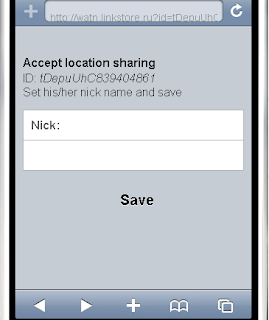
It is obviously, that in this schema each client has got own legends. We can have different names for one ID (each client technically can assign own name).
Implementation. WATN is mobile web application (HTML5). So, we can use localStorage as a persistent store for legends.
Additional options. As soon as you share your location info, you can leave messages attached to your location. WATN users that can read your location data will see your messages too.
And any time you can delete ID (as well as erase all the associated data) from the system.
You can load WATN application right to your mobile browser (iPhone, Android) with the following QR-code:

Direct link is http://watn.linkstore.ru (it is a mobile URL)
P.S. there is another service with the "similar" abbreviation: Where Are You Now.
Actually our Geo Messages project solves problems with privacy. With Geo Messages users can share location info peer to peer as signatures for messages. But it is pure one-to-one relation. What if we need to monitor several people? Here is our new service WATN. It lets you monitor locations for several people, as well as share your own location to some group of people. Obviously, in this case we need some third party server that saves our social graph (who is sharing data to whom). But we can offer the safe solution that does not hurt your privacy.
WATN requires no sign-up. It combines anonymous server-side data with local personalized records.
What if we separate location info and identity data? Just three steps:
a) assign to any participant some unique ID (just an ID, without any links to the personality)
b) save location data on the server with links to the above-mentioned IDs
c) keep the legend (descriptions for IDs, who is behind that ID) locally

In this case any participant may request location data for other participants from third party server (as per sharing rules, of course), get data with IDs and replace IDs (locally) with legend’s data. With such replacement we can show location data in the "natural" form. For example: name (nick) plus location. And in the same time the server (third party server for our users) is not aware about names.
What does it mean technically.
Server keeps location info with IDs:
(a)
ID1 -> (latitude, longitude)
ID2 -> (latitude, longitude)
ID3 -> (latitude, longitude)
Etc.
And social graph – who is sharing location to whom:
(b)
ID1-> (ID2, ID3)
ID3 -> (ID1)
Etc.
Local client keeps legend:
(c)
ID1 -> (name or nick)
ID2 -> (name or nick)
Etc.
The algorithm. Client restores own ID (or obtains a new one). After that client saves location data on the server and obtains shared location data (by the social graph). Client modifies received data and replaces IDs with known names. So, after that our client side application is ready to show location data with names instead of IDs.
Naming. Where are the above-mentioned names (nicks) for IDs come from? WATN uses peer to peer sharing. It means that any user shares own location to another person directly. There are no circles, lists etc. As soon as some user is going to show own location info to another person he simply sends notification about this to another email address (phone number in case of SMS).
Such notification contains some text with explanation "what is it" and, what is obviously should be the main part of this process, a special link to WATN. This link contains an ID for the request originating party.

As soon as this link is fired, WATN application (client) becomes aware about two IDs: own ID1 for this client (see description above) and ID2 from the "shared with you" link (originated request ID). So, if notification is accepted, we can add social graph record (on the server) like
ID2 -> ID1
(client with ID2 shares own location info with the client with ID1. Or client with ID1 identity may read location info for ID2)
But because the notification link comes from email (or SMS) the receiver is aware about the context. He knows simply email headers ('From'), phone number or name in address book SMS comes from. It means the receiver can assign some nick (name) for ID in "shared with you" link. Actually it is a part of confirmation: set some name and confirm. And that name (nick) we can save locally. So, it is like "two phase commit" in databases – save a new social graph record on the server and create a new legend locally.

It is obviously, that in this schema each client has got own legends. We can have different names for one ID (each client technically can assign own name).
Implementation. WATN is mobile web application (HTML5). So, we can use localStorage as a persistent store for legends.
Additional options. As soon as you share your location info, you can leave messages attached to your location. WATN users that can read your location data will see your messages too.
And any time you can delete ID (as well as erase all the associated data) from the system.
You can load WATN application right to your mobile browser (iPhone, Android) with the following QR-code:
Direct link is http://watn.linkstore.ru (it is a mobile URL)
P.S. there is another service with the "similar" abbreviation: Where Are You Now.
Tuesday, July 19, 2011
Geo Messages
Our Geo messages project has been updated. Lets you share location info on the peer to peer basic as a signature to the standard messages (email, SMS).
Lets us highlight again the basic moments. It is well known fact that the question "where are you" is one of the most often asked in the world of mobile communications. 600 billion text messages per year in the US ask "where are you?" – as per Location Business Summit 2010 data. A huge amount of mobile services is actually being built around this question so their main feature is user’s locations exchange. In the most cases it is implemented as the ability for the mobile user (mobile phone owner) write down own location info in the some special place (special mobile application). But it means of course, that user must be registered in location-sharing service (e.g. download some special application). And what is even more important – everyone who needs this information must use the same service too.
Typically we have now two models for location sharing in services. At the first hand it is passive location monitoring and future access to the accumulated data trough some API. It is Google Latitude for example.
Possible problems are privacy - some third party tool is constantly monitoring my location and what is more important – saves it on the some external server as well as the shorted life time for handset’s battery.
Another popular model for location sharing is check-in procedure in the various forms. Check-in could be an active (e.g. Foursquare), when user directly sets his/her current location or passive (e.g. Twitter) when location info could be added to the current message (status). But here we can see not only privacy issue - all my friends/followers can see my location but also a noise issue – my location info could be actually interested only for the physical friends. For the majority of followers my location info (e.g. Foursquare status in Twitter time line) is just a noise.
Our idea of the signed geo messages service (geo mail, geo sms) based on the adding user’s location info to the standard messages like SMS or email. Just as a signature. So with this service for telling somebody "where I am" it would be just enough to send him/her a message. And your partner does not need to use any additional service in order to get information about your location. He/she will simply read SMS or email.
It is obviously peer to peer sharing and does not require any social network. Our location signature has got a form of the link to some mobile map with the marker at the shared location. And what is important here – the map itself has no information about the sender and recipient. That information exists only in the message itself. The map (marker) has no information about the creator for example. That is all about privacy.
There are several implementations for this approach: mobile web mashups (HTML5), mobile web widgets, Java Card applets for legacy phones, JME midlet for mobile Java phones as well as solutions for web applications.
See more details on Geo Messages page.
By the way, our Geo Message application for Android has been updated too.
P.S. here is a Twitter mashups that uses Geo Messages ideas: share location info via Twitter.
Lets us highlight again the basic moments. It is well known fact that the question "where are you" is one of the most often asked in the world of mobile communications. 600 billion text messages per year in the US ask "where are you?" – as per Location Business Summit 2010 data. A huge amount of mobile services is actually being built around this question so their main feature is user’s locations exchange. In the most cases it is implemented as the ability for the mobile user (mobile phone owner) write down own location info in the some special place (special mobile application). But it means of course, that user must be registered in location-sharing service (e.g. download some special application). And what is even more important – everyone who needs this information must use the same service too.
Typically we have now two models for location sharing in services. At the first hand it is passive location monitoring and future access to the accumulated data trough some API. It is Google Latitude for example.
Possible problems are privacy - some third party tool is constantly monitoring my location and what is more important – saves it on the some external server as well as the shorted life time for handset’s battery.
Another popular model for location sharing is check-in procedure in the various forms. Check-in could be an active (e.g. Foursquare), when user directly sets his/her current location or passive (e.g. Twitter) when location info could be added to the current message (status). But here we can see not only privacy issue - all my friends/followers can see my location but also a noise issue – my location info could be actually interested only for the physical friends. For the majority of followers my location info (e.g. Foursquare status in Twitter time line) is just a noise.
Our idea of the signed geo messages service (geo mail, geo sms) based on the adding user’s location info to the standard messages like SMS or email. Just as a signature. So with this service for telling somebody "where I am" it would be just enough to send him/her a message. And your partner does not need to use any additional service in order to get information about your location. He/she will simply read SMS or email.
It is obviously peer to peer sharing and does not require any social network. Our location signature has got a form of the link to some mobile map with the marker at the shared location. And what is important here – the map itself has no information about the sender and recipient. That information exists only in the message itself. The map (marker) has no information about the creator for example. That is all about privacy.
There are several implementations for this approach: mobile web mashups (HTML5), mobile web widgets, Java Card applets for legacy phones, JME midlet for mobile Java phones as well as solutions for web applications.
See more details on Geo Messages page.
By the way, our Geo Message application for Android has been updated too.
P.S. here is a Twitter mashups that uses Geo Messages ideas: share location info via Twitter.
Monday, June 27, 2011
Weather info via Twitter
We wrote already about our Twitter mashup – Twitter 411 service. It is a web application lets you easily create your own Twitter bots. Bot here is an application that receives some requests via Twitter and responds with your own data. You define a form for the request as well as the content for the response. Here is an example for such a bot (stock market).
As a response for the bot within t411 service you can provide any CGI script (e.g. jsp, java servlet, php etc.) on your own site. See again here a complete example (JSP) for stock market bot.
And now let us see a yet another example. Now it is a weather bot.
How does it work? The source data provided by the site yr.no This site contains weather forecast around the world. And what is important, you can pickup weather data in XML or RSS format. So it is a quick deal to build some automation processing. We create a new bot for t411 service – code for the request is w
As a reaction for this bot we've set a JSP file that obtains RSS data from yr.no, presents them in mobile ready form and responds back with a link to the requested forecast. Here is a part of that file:
<div class="content">
<%@ taglib uri="/WEB-INF/taglib374.tld" prefix="w" %>
<w:setLocation url="http://www.yr.no/place/United_Kingdom/England/London/" ttl="36000" id="A"/>
<w:forEachDay feedId="A">
<strong><%=itemTitle%></strong><br/>
<img src="<%=itemImage%>" style="border:0;float:left;padding-right:5px" alt=''/>
<%=itemDescription%><br/><br/>
</w:forEachDay>
<br/>© <w:getChannelCopyright feedId="A"/>
<w:getChannelLink feedId="A" id="url"/>
<br/><a href="<%=url%>">Original data</a><br/>
</div>
code uses the Weather taglib from Coldtags suite. Tag setLocation requests rss feed (and caches it for 10 hours. Tag forEachDay outputs data. And finally we prints a copyright information as well as the back link (as it is required by yr.no)
The rest of the deal is standard. Send to user @t411 a reply or direct message for the weather forecast you are interested in.
Here are examples (what the bot recognizes and what you have to send as reply or direct message to @t411):
And the result (you will get a reply or direct message back) is a link to the mobile site with the forecast. Because it is a mobile site you will be able to open it right from your mobile phone.
The direct messages from Twitter could be delivered by SMS to user's mobile. And so – the mobile link will be delivered too. That was the original idea for t411 service – Twitter could be used as an alternative model for programming SMS services. Twitter is a new transport layer here.
As a response for the bot within t411 service you can provide any CGI script (e.g. jsp, java servlet, php etc.) on your own site. See again here a complete example (JSP) for stock market bot.
And now let us see a yet another example. Now it is a weather bot.
How does it work? The source data provided by the site yr.no This site contains weather forecast around the world. And what is important, you can pickup weather data in XML or RSS format. So it is a quick deal to build some automation processing. We create a new bot for t411 service – code for the request is w
As a reaction for this bot we've set a JSP file that obtains RSS data from yr.no, presents them in mobile ready form and responds back with a link to the requested forecast. Here is a part of that file:
<div class="content">
<%@ taglib uri="/WEB-INF/taglib374.tld" prefix="w" %>
<w:setLocation url="http://www.yr.no/place/United_Kingdom/England/London/" ttl="36000" id="A"/>
<w:forEachDay feedId="A">
<strong><%=itemTitle%></strong><br/>
<img src="<%=itemImage%>" style="border:0;float:left;padding-right:5px" alt=''/>
<%=itemDescription%><br/><br/>
</w:forEachDay>
<br/>© <w:getChannelCopyright feedId="A"/>
<w:getChannelLink feedId="A" id="url"/>
<br/><a href="<%=url%>">Original data</a><br/>
</div>
code uses the Weather taglib from Coldtags suite. Tag setLocation requests rss feed (and caches it for 10 hours. Tag forEachDay outputs data. And finally we prints a copyright information as well as the back link (as it is required by yr.no)
The rest of the deal is standard. Send to user @t411 a reply or direct message for the weather forecast you are interested in.
Here are examples (what the bot recognizes and what you have to send as reply or direct message to @t411):
w london  get forecast for London
w paris   get forecast for Paris
w msk     get forecast for Moscow
w spb     get forecast for Sankt-Petersburg
And the result (you will get a reply or direct message back) is a link to the mobile site with the forecast. Because it is a mobile site you will be able to open it right from your mobile phone.
The direct messages from Twitter could be delivered by SMS to user's mobile. And so – the mobile link will be delivered too. That was the original idea for t411 service – Twitter could be used as an alternative model for programming SMS services. Twitter is a new transport layer here.
Wednesday, June 15, 2011
How to make a bot for Twitter
Twitter bot is an application that automatically responds to users requests. It could be done in Twitter either via @reply postings or via direct messages.
Here we will show how to use Twitter 411 service for your own bots creation. E.g. you can create there your own information system for the business or private purposes.
411 for Twitter uses Twitter as transport layer. A potential user can follow to @t411 and send direct messages to @t411 or simply post a reply. The responses will come back as replies or direct messages too. And users of Twitter 411 service define how to proceed requests. They can reserve some keywords as well as associated rules described how to proceed messages starting with that keyword.
As a method of message processing service users can choose an URL for some CGI script. This script will be responsible for the processing the incoming messages and producing the responses. Twitter 411 service works in this case as a daemon: gets a message, passes it to the appropriate CGI script, reads the response and sends it back. Let us see how does it looks like practically. Service Twitter 411 includes build-in bot lets you request stock quotes. Let us see its internals:
1. We've registered a keyword t (just a letter t). So all the direct messages starting with t (t will be processed by this bot.
2. Our bot expects messages in the following format t stock_symbol for getting the quote. For example:
t ORCL - quote for Oracle
or
t LNKD - quote for Linkedin
3. As a processing engine for this bot we've set an URL for JSP file. It is our CGI script for the processing: http://linkstore.ru/t411/quote.jsp. For this bot our processing will be placed on the same server, but of course you can provide your own URL for any available server.
4. We can instruct Twitter 411 (our daemon) pass the whole incoming message to our CGI script. So in service's GUI we've set actually the following URL :
http://linkstore.ru/t411/quote.jsp?t=text
Service (daemon) will replace the variable text with the original request. For example, for the following incoming message t ORCL the final request to CGI script will looks so: http://linkstore.ru/t411/quote.jsp?t=t%20ORCL.
Now let us see the script itself. In our case it is JSP file expecting requests with the parameter t. And parameter's value will be in the following form t stock_symbol. So, our script (JSP file) will read parameter's value, extract stock symbol (part of the string after the space), request quote and print the result. It is all. For example:
<%@ page contentType="text/plain; charset=utf-8" %>
<%@ taglib uri="taglib27.tld" prefix="get" %>
<%
String t = request.getParameter("t");
if (t==null)
{ out.println("unknown");
return; }
// the pattern is: t <space> stock_symbol
int i = t.indexOf(" ");
if (i<=0) { out.println(t+"?? could not get ticket"); return; } t = t.substring(i+1).trim(); %>
<get:Quote symbol="<%=t.toUpperCase()%>" id="A" />
<%=A.get(0)+": "+A.get(1)+" "+A.get(9)%>
Here our JSP file prints the quote and its chart (we've used custom tags from Coldtags suite)
In other words - all what do you need for your own Twitter bot is just an ordinary CGI script with your own processing. You can program your own script, reuse something existing component etc. And your Twitter bot could be placed on any web server with CGI scripts support.
Here we will show how to use Twitter 411 service for your own bots creation. E.g. you can create there your own information system for the business or private purposes.
411 for Twitter uses Twitter as transport layer. A potential user can follow to @t411 and send direct messages to @t411 or simply post a reply. The responses will come back as replies or direct messages too. And users of Twitter 411 service define how to proceed requests. They can reserve some keywords as well as associated rules described how to proceed messages starting with that keyword.
As a method of message processing service users can choose an URL for some CGI script. This script will be responsible for the processing the incoming messages and producing the responses. Twitter 411 service works in this case as a daemon: gets a message, passes it to the appropriate CGI script, reads the response and sends it back. Let us see how does it looks like practically. Service Twitter 411 includes build-in bot lets you request stock quotes. Let us see its internals:
1. We've registered a keyword t (just a letter t). So all the direct messages starting with t (t
2. Our bot expects messages in the following format t stock_symbol for getting the quote. For example:
t ORCL - quote for Oracle
or
t LNKD - quote for Linkedin
3. As a processing engine for this bot we've set an URL for JSP file. It is our CGI script for the processing: http://linkstore.ru/t411/quote.jsp. For this bot our processing will be placed on the same server, but of course you can provide your own URL for any available server.
4. We can instruct Twitter 411 (our daemon) pass the whole incoming message to our CGI script. So in service's GUI we've set actually the following URL :
http://linkstore.ru/t411/quote.jsp?t=text
Service (daemon) will replace the variable text with the original request. For example, for the following incoming message t ORCL the final request to CGI script will looks so: http://linkstore.ru/t411/quote.jsp?t=t%20ORCL.
Now let us see the script itself. In our case it is JSP file expecting requests with the parameter t. And parameter's value will be in the following form t stock_symbol. So, our script (JSP file) will read parameter's value, extract stock symbol (part of the string after the space), request quote and print the result. It is all. For example:
<%@ page contentType="text/plain; charset=utf-8" %>
<%@ taglib uri="taglib27.tld" prefix="get" %>
<%
String t = request.getParameter("t");
if (t==null)
{ out.println("unknown");
return; }
// the pattern is: t <space> stock_symbol
int i = t.indexOf(" ");
if (i<=0) { out.println(t+"?? could not get ticket"); return; } t = t.substring(i+1).trim(); %>
<get:Quote symbol="<%=t.toUpperCase()%>" id="A" />
<%=A.get(0)+": "+A.get(1)+" "+A.get(9)%>
Here our JSP file prints the quote and its chart (we've used custom tags from Coldtags suite)
In other words - all what do you need for your own Twitter bot is just an ordinary CGI script with your own processing. You can program your own script, reuse something existing component etc. And your Twitter bot could be placed on any web server with CGI scripts support.
Monday, February 21, 2011
Geo Messages project
Our Geo messages project has been updated. Lets you share location info on the peer to peer basic as a signature to the standard messages (email, SMS).
Lets us repeat here the main idea. It is obvious, that the question "where are you" is one of the most often asked during the communications. 600 billion text messages per year in the US ask "where are you?" – as per Location Business Summit 2010 data. A huge amount of mobile services is actually being built around this question so their main feature is user’s location exchange. In the most cases it is implemented as the ability for the mobile user (mobile phone owner) write down own location info in the some special place (special mobile application). But it means of course, that user must be registered in location-sharing service (e.g. download some special application). And what is even more important – everyone who needs this information must use the same service too.
Typically we have now two models for location sharing in services. At the first hand it is passive location monitoring and future access to the accumulated data trough some API. It is Google Latitude for example.
Possible problems are privacy - some third party tool is constantly monitoring my location and what is more important – saves it on the some external server as well as the shorted life time for handset’s battery.
Another popular model for location sharing are check-in procedures in the various forms. Check-in could be an active (e.g. Foursquare), when user directly sets his/her current location or passive (e.g. Twitter) when location info could be added to the current message (status). But here we can see not only privacy issue - all my friends/followers can see my location but also a noise issue – my location info could be actually interested only for the physical friends. For the majority of followers my location info (e.g. Foursquare status in Twitter time line) is just a noise.
Our idea of the signed geo messages service (geo mail, geo sms) based on the adding user’s location info to the standard messages like SMS or email. Just as a signature. So with this service for telling somebody "where I am" it would be just enough to send him/her a message. And your partner does not need to use any additional service in order to get information about your location. He/she will simply read SMS or email.
It is obviously peer to peer sharing and does not require any social network. Our location signature has got a form of the link to some mobile map with the marker at the shared location. And what is important here – the map itself has no information about the sender and recipient. That information exists only in the message itself. The map (marker) has no information about the creator for example. That is all about privacy.
There are several implementations for this approach: mobile web mashups (HTML5), mobile web widgets, Java Card applets for legacy phones, JME midlet for mobile Java phones as well as solutions for web applications.
See more details on Geo Messages page.
For example, our Geo Message application for Android has been updated too.
Lets us repeat here the main idea. It is obvious, that the question "where are you" is one of the most often asked during the communications. 600 billion text messages per year in the US ask "where are you?" – as per Location Business Summit 2010 data. A huge amount of mobile services is actually being built around this question so their main feature is user’s location exchange. In the most cases it is implemented as the ability for the mobile user (mobile phone owner) write down own location info in the some special place (special mobile application). But it means of course, that user must be registered in location-sharing service (e.g. download some special application). And what is even more important – everyone who needs this information must use the same service too.
Typically we have now two models for location sharing in services. At the first hand it is passive location monitoring and future access to the accumulated data trough some API. It is Google Latitude for example.
Possible problems are privacy - some third party tool is constantly monitoring my location and what is more important – saves it on the some external server as well as the shorted life time for handset’s battery.
Another popular model for location sharing are check-in procedures in the various forms. Check-in could be an active (e.g. Foursquare), when user directly sets his/her current location or passive (e.g. Twitter) when location info could be added to the current message (status). But here we can see not only privacy issue - all my friends/followers can see my location but also a noise issue – my location info could be actually interested only for the physical friends. For the majority of followers my location info (e.g. Foursquare status in Twitter time line) is just a noise.
Our idea of the signed geo messages service (geo mail, geo sms) based on the adding user’s location info to the standard messages like SMS or email. Just as a signature. So with this service for telling somebody "where I am" it would be just enough to send him/her a message. And your partner does not need to use any additional service in order to get information about your location. He/she will simply read SMS or email.
It is obviously peer to peer sharing and does not require any social network. Our location signature has got a form of the link to some mobile map with the marker at the shared location. And what is important here – the map itself has no information about the sender and recipient. That information exists only in the message itself. The map (marker) has no information about the creator for example. That is all about privacy.
There are several implementations for this approach: mobile web mashups (HTML5), mobile web widgets, Java Card applets for legacy phones, JME midlet for mobile Java phones as well as solutions for web applications.
See more details on Geo Messages page.
For example, our Geo Message application for Android has been updated too.
Wednesday, January 12, 2011
Pay by social network posting
It is a new business model for QR-code usage. Lets us see for example check-in model in Foursquare. Users check-in, service writes this information into user’s timeline and business delivers some benefits for the customers. And check-in information is on the practice a link to the services itself rather that a link to the business. So why do not make this process more logical at the end of the day? Ask users to put business related info into his her time line/wall etc. and deliver back some benefits (coupons, discounts, gifts, some free stuff etc.). So business will deliver benefits for the links in the social networks.
It is exactly what our service QRpon is about. This service lets any business create a mobile site for publishing data in social networks in exchange for some confirmation (coupon, discount info etc.) The process of creating mobile site is simple. Just set some text information about your business/offering, set a text for publishing in the social network and text for the confirmation. QRpon service will create a mobile site as well as QR-code for it. You can test this site (process) using this QR-code. If everything is Ok, just print this QR-code and place it on your business site. This QR code presents a physical (on-site) checkin for the customers.
End user can scan QR-code right from his/her phone, open mobile web site andyou’re your info/offering. If user is agreed, he/she can login to social network (right from the mobile site, there is Facebook connect button). Site will automatically publish your data (see above) to user’s wall/time line and return back the confirmation screen. This screen (e.g. coupon) could be presented to the staff for getting benefits. In other words it is like QR-code for coupons – that is the where the name QRpon comes from.
You can treat this service as pay links in the physical words. Customer pays for benefits by placing business data in the own social graph. Customer will get the benefits; business will get the social networks marketing. And the process works without the intermediate broker (read- without the checkin/places services).
On the main page QRpon service you can see a test QR-code. You can scan it and see how does this process work. For the accepting you need to login with your Facebook ID.
And for your own action just click 'Create QRpon' link. Set service info(description), text for publishing and the confirmation. Mobile web site generated by the service works with any HTML5 browser, so you can use it from iPhone, Android, Samsung etc.
It is exactly what our service QRpon is about. This service lets any business create a mobile site for publishing data in social networks in exchange for some confirmation (coupon, discount info etc.) The process of creating mobile site is simple. Just set some text information about your business/offering, set a text for publishing in the social network and text for the confirmation. QRpon service will create a mobile site as well as QR-code for it. You can test this site (process) using this QR-code. If everything is Ok, just print this QR-code and place it on your business site. This QR code presents a physical (on-site) checkin for the customers.
End user can scan QR-code right from his/her phone, open mobile web site andyou’re your info/offering. If user is agreed, he/she can login to social network (right from the mobile site, there is Facebook connect button). Site will automatically publish your data (see above) to user’s wall/time line and return back the confirmation screen. This screen (e.g. coupon) could be presented to the staff for getting benefits. In other words it is like QR-code for coupons – that is the where the name QRpon comes from.
You can treat this service as pay links in the physical words. Customer pays for benefits by placing business data in the own social graph. Customer will get the benefits; business will get the social networks marketing. And the process works without the intermediate broker (read- without the checkin/places services).
On the main page QRpon service you can see a test QR-code. You can scan it and see how does this process work. For the accepting you need to login with your Facebook ID.
And for your own action just click 'Create QRpon' link. Set service info(description), text for publishing and the confirmation. Mobile web site generated by the service works with any HTML5 browser, so you can use it from iPhone, Android, Samsung etc.
P.S. and here you can create customized Like buttons
P.P.S. and here you can a huge list of services and mashups with QR-codes: QR-code how to.
Friday, December 17, 2010
Geo Messages
Our Geo messages project has been updated. Lets you share location info on the peer to peer basic as a signature to the standard messages (email, SMS).
It is obvious, that the question "where are you" is one of the most often asked during the communications. 600 billion text messages per year in the US ask "where are you?" – as per Location Business Summit 2010 data. A huge amount of mobile services is actually being built around this question so their main feature is user’s location exchange. In the most cases it is implemented as the ability for the mobile user (mobile phone owner) write down own location info in the some special place (special mobile application). But it means of course, that user must be registered in this service (download some special application). And even more important – everyone who needs this information must use the same service too.
Typically we have now two models for location sharing in services. At the first hand is passive location monitoring and future access to the accumulated data trough some API. It is Google Latitude for example.
Possible problems are privacy - some third party tool is constantly monitoring my location and what is more important – saves it on the some external server as well as the shorted life for handset’s battery.
Another popular model for location sharing is check-in procedure in the various forms. It could be an active (e.g. Foursquare), when user directly sets his/her current location or passive (e.g. Twitter) when location info could be added to the current message (status). But here we can see not only privacy issue - all my friends/followers can see my location but also a noise issue – my location info could be actually interested only for the physical friends. For the majority of followers my location info (e.g. Foursquare status in Twitter time line) is just a noise.
Our idea of the signed geo messages service (geo mail, geo sms) based on the adding user’s location info to the standard messages like SMS or email. Just as a signature. So with this service for telling somebody "where I am" it would be just enough to send him/her a message. And your partner does not need to use any additional service in order to get information about your location. He/she will simply read SMS or email.
It is obviously peer to peer sharing and does not require any social network. Our location signature has got a form of the link to some mobile map with the marker at the shared location. And what is important here – the map itself has no information about the sender and recipient. That information exists only in the message itself. The map (marker) has no information about the creator for example. That is all about privacy.
There are several implementations for this approach: mobile web mashups (HTML5), mobile web widgets, Java Card applets for legacy phones, JME midlet for mobile Java phones as well as solutions for web applications.
And this update introduces Android application: Geo SMS. See more details on Geo Messages page.
It is obvious, that the question "where are you" is one of the most often asked during the communications. 600 billion text messages per year in the US ask "where are you?" – as per Location Business Summit 2010 data. A huge amount of mobile services is actually being built around this question so their main feature is user’s location exchange. In the most cases it is implemented as the ability for the mobile user (mobile phone owner) write down own location info in the some special place (special mobile application). But it means of course, that user must be registered in this service (download some special application). And even more important – everyone who needs this information must use the same service too.
Typically we have now two models for location sharing in services. At the first hand is passive location monitoring and future access to the accumulated data trough some API. It is Google Latitude for example.
Possible problems are privacy - some third party tool is constantly monitoring my location and what is more important – saves it on the some external server as well as the shorted life for handset’s battery.
Another popular model for location sharing is check-in procedure in the various forms. It could be an active (e.g. Foursquare), when user directly sets his/her current location or passive (e.g. Twitter) when location info could be added to the current message (status). But here we can see not only privacy issue - all my friends/followers can see my location but also a noise issue – my location info could be actually interested only for the physical friends. For the majority of followers my location info (e.g. Foursquare status in Twitter time line) is just a noise.
Our idea of the signed geo messages service (geo mail, geo sms) based on the adding user’s location info to the standard messages like SMS or email. Just as a signature. So with this service for telling somebody "where I am" it would be just enough to send him/her a message. And your partner does not need to use any additional service in order to get information about your location. He/she will simply read SMS or email.
It is obviously peer to peer sharing and does not require any social network. Our location signature has got a form of the link to some mobile map with the marker at the shared location. And what is important here – the map itself has no information about the sender and recipient. That information exists only in the message itself. The map (marker) has no information about the creator for example. That is all about privacy.
There are several implementations for this approach: mobile web mashups (HTML5), mobile web widgets, Java Card applets for legacy phones, JME midlet for mobile Java phones as well as solutions for web applications.
And this update introduces Android application: Geo SMS. See more details on Geo Messages page.
Friday, October 15, 2010
Geo Messages
Our Geo Messages project has been updated again.
Rather than let social network monitor your location (Google Latitude) or share your location info within some social circle (Foursquare check-in etc.) Geo Messages approach lets you share location data on the peer to peer basic. You can share your location info just as a signature to the standard messaging (email, SMS). And what is important – shared location data (map) does not contain your identity. Your ID (name, phone) is in your email (SMS) only. The shared map does not reveal anything about the author.
By the same principles you can also share location info with your Twitter and/or Facebook friends. The latest update includes Where are you now mashup too. It lets you request location info by email.
Rather than let social network monitor your location (Google Latitude) or share your location info within some social circle (Foursquare check-in etc.) Geo Messages approach lets you share location data on the peer to peer basic. You can share your location info just as a signature to the standard messaging (email, SMS). And what is important – shared location data (map) does not contain your identity. Your ID (name, phone) is in your email (SMS) only. The shared map does not reveal anything about the author.
By the same principles you can also share location info with your Twitter and/or Facebook friends. The latest update includes Where are you now mashup too. It lets you request location info by email.
Thursday, August 12, 2010
Geo Messages
Our Geo Messages project has been updated again.
Rather than let social network monitor your location (Google Latitude) or share your location info with some social circle (Foursquare check-in etc.) Geo Messages approach lets you share location data on the peer to peer basic. You can share your location info just as a signature to the standard messaging (email, SMS). And what is important – shared location data (map) does not contain your identity. Your ID (name, phone) is in your email (SMS) only. The shared map does not reveal anything about the author.
In the last version you can also share location info with your Twitter and/or Facebook friends.
Rather than let social network monitor your location (Google Latitude) or share your location info with some social circle (Foursquare check-in etc.) Geo Messages approach lets you share location data on the peer to peer basic. You can share your location info just as a signature to the standard messaging (email, SMS). And what is important – shared location data (map) does not contain your identity. Your ID (name, phone) is in your email (SMS) only. The shared map does not reveal anything about the author.
In the last version you can also share location info with your Twitter and/or Facebook friends.
Subscribe to:
Posts (Atom)